
Mazda 3 Service Manual: Ambient Temperature Sensor Removal/Installation [Manual Air Conditioner]
1. Disconnect the negative battery cable..
2. Remove the aerodynamic under cover No.2..
3. Remove the aerodynamic under cover No.1..
4. Disconnect the connector.
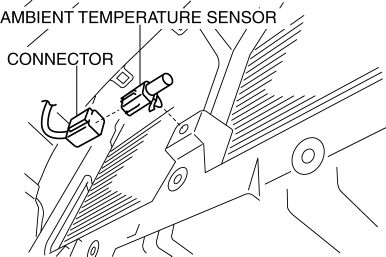
5. Remove the ambient temperature sensor.
6. Install in the reverse order of removal.
 Ambient Temperature Sensor Removal/Installation [Full Auto Air Conditioner]
1. Disconnect the negative battery cable..
2. Remove the aerodynamic under cover No.2..
3. Remove the aerodynamic under cover No.1..
4. Disconnect the connector.
5. Remove the ambient temp ...
 Blower Motor Inspection [Full Auto Air Conditioner]
1. Connect battery positive voltage to blower motor terminal A, connect terminal
B to ground, and then verify its operation.
If there is any malfunction, replace the blower motor.
...
Other materials:
Combination Switch Removal/Installation
CAUTION:
Handling the air bag module improperly can accidentally deploy the air bag
module, which may seriously injure you. Read the air bag system service warnings
and cautions before handling the air bag module..
1. Switch the ignition to off.
2. Disconnect the negative batte ...
Discharge Headlight System Inspection
Discharge headlight inoperative
WARNING:
Incorrect servicing of the discharge headlight bulb could result in electrical
shock. Before servicing the discharge headlight bulb, always refer to the service
warnings..
Terminal layout
Inspection procedure
ST ...
Trunk Lid Opener Switch Inspection
1. Disconnect the negative battery cable..
2. Remove the trunk lid trim..
3. Remove the high-mount brake light..
4. Remove the trunk lid opener switch..
5. Verify the continuity of trunk lid opener switch terminals A and B.
6. Verify that the continuity is as indicated in the table.
...
