
Mazda 3 Service Manual: Automatic Transaxle Fluid (ATF) Adjustment [Fw6 A EL]
CAUTION:
-
Only adjust the ATF level when the ATF temperature is 45—55 °C {113—131 °F}. If the ATF level is incorrect, it could damage the transaxle.
-
Do not add ATF over the specification. Otherwise, the transaxle performance could be reduced and ATF could leak.
1. Remove aerodynamic undercover No.2..
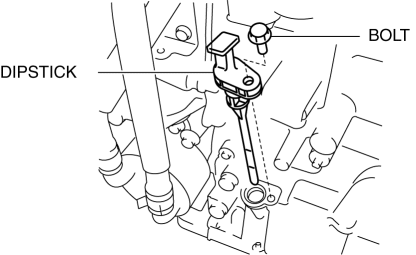
2. Remove the dipstick securing bolt.
3. Remove the dipstick.
4. Adjust the ATF level.
a. Connect the M-MDS to the DLC-2 and display the PID TFT.
b. Warm up the engine until the ATF temperature is 50 °C {122 °F}
.
c. Remove the dipstick and wipe the ATF off using a rag while leaving the engine idling.
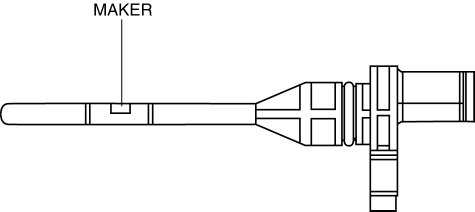
d. Insert the dipstick and pull it out again.
e. Verify that ATF is adhering to the central marker area on the dipstick.
-
If ATF is not adhering to the central marker area on the dipstick, adjust the ATF level to the central marker area.
NOTE:
-
The ATF color is blue.
-
Only use genuine ATF FZ for the FW6A-EL.
-
ATF type
-
Genuine ATF FZ
5. Insert the dipstick and remove the securing bolt.
-
Tightening torque
-
8—11 N·m {82—112 kgf·cm, 71—97 in·lbf}
6. Install aerodynamic undercover No.2..
 Automatic
...
 Automatic Transaxle Fluid (ATF) Inspection [FS5 A EL]
Automatic Transaxle Fluid (ATF) Condition Inspection
1. One way of determining whether the transaxle should be disassembled is by
noting:
If the ATF is muddy or varnished.
If the AT ...
Other materials:
Cleaning and protecting the vehicle interior
For the Subaru Solterra, interior cleaning should always be performed
according to the specific material of each component in order to preserve durability,
appearance, and long-term comfort.
Protecting the vehicle interior
In the Subaru Solterra, begin cleaning by removing dust and debris u ...
Back Up Light Switch Removal/Installation [A26 M R]
1. Disconnect the negative battery cable.
2. Disconnect the back-up light switch connector.
3. Remove the aerodynamic under cover No.2..
4. Remove the back-up light switch with the gasket.
5. Install a new gasket and the back-up light switch to the transaxle case.
Tightening torque ...
Transaxle Range (TR) Switch Removal/Installation [FS5 A EL]
CAUTION:
Water or foreign objects entering the connector can cause a poor connection
or corrosion. Be sure not to drop water or foreign objects on the connector
when disconnecting it.
1. Engage the parking brake and use wheel chocks at the front and rear of the
wheels.
2. Shi ...
