
Mazda 3 Service Manual: Charcoal Canister Inspection [Mzr 2.0, Mzr 2.5]
Leakage Inspection
1. Perform the following procedures:
-
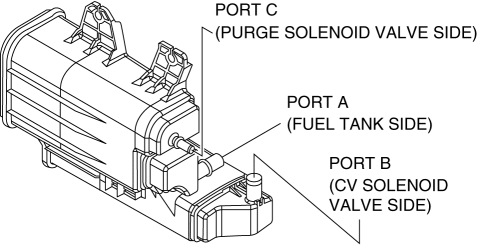
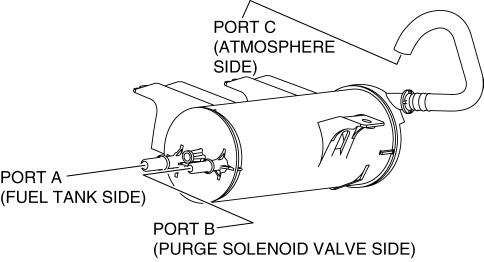
Assemble the hose used for inspection to port A.
-
Cover ports B and C with the caps.
Except for Mexico
Mexico
CAUTION:
-
Do not apply a pressure 20 kPa {150 mmHg, 5.91 inHg} or more to the charcoal canister for 1 min. or more. Doing so will damage the charcoal canister.
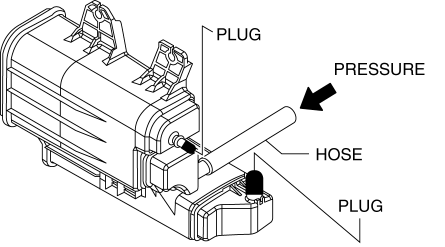
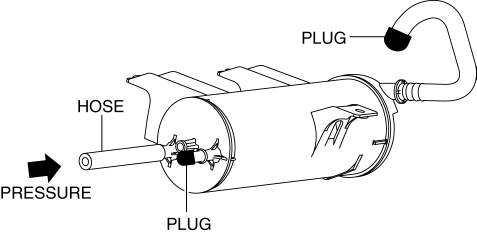
2. Apply pressure (19.6 kPa {147 mmHg, 5.79 inHg}
) through the hose, and verify that air does not leak from the charcoal canister.
Except for Mexico
Mexico
-
If there is airflow, replace the charcoal canister..
-
If there is no airflow, perform the following “Airflow Inspection”.
Airflow Inspection
1. Perform the following procedure to verify the charcoal canister airflow.
-
Between port A and port B
-
Plug the port C.
Except for Mexico
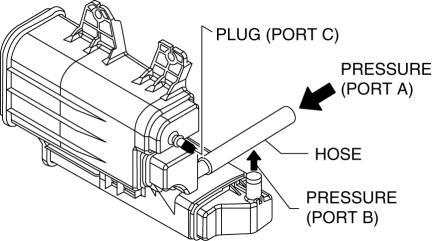
Mexico
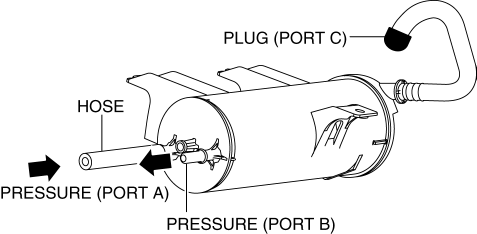
-
Apply a pressure of 19.6 kPa {147 mmHg, 5.79 inHg}
to port A.
-
Verify that there is airflow from port B.
-
If there is no airflow, replace the charcoal canister..
-
Between port A and port C
-
Plug the port B.
Except for Mexico
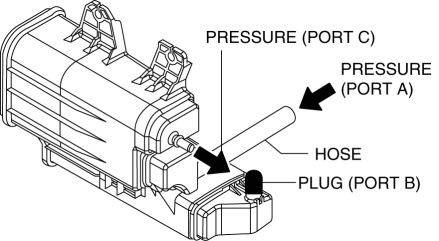
Mexico
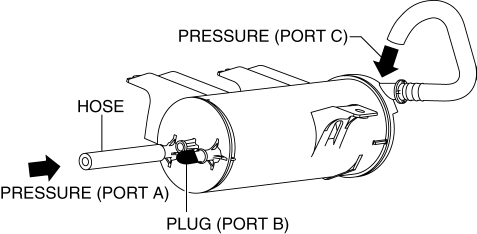
-
Apply a pressure of 19.6 kPa {147 mmHg, 5.79 inHg}
to port A.
-
Verify that there is airflow from port C.
-
If there is no airflow, replace the charcoal canister..
-
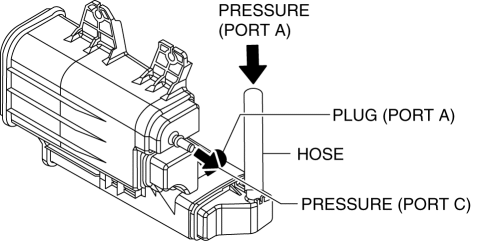
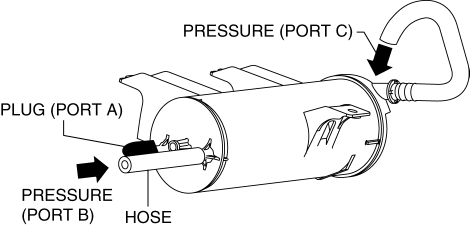
Between port B and port C
-
Plug the port A.
Except for Mexico
Mexico
-
Apply a pressure of 19.6 kPa {147 mmHg, 5.79 inHg}
to port B.
-
Verify that there is airflow from port C.
-
If there is no airflow, replace the charcoal canister..
 Catch Tank Inspection [Skyactiv G 2.0]
1. Remove the catch tank..
2. Plug the catch tank of the purge solenoid valve side.
3. Inspect for air leakage when blowing air pressure from charcoal canister side.
If there is air l ...
 Charcoal Canister Removal/Installation [Mzr 2.0, Mzr 2.5]
Except for Mexico
1. Remove in the order indicated in the table.
1
Evaporative hose
2
Quick release connector
(See QUICK RELEASE CONNECTOR ...
Other materials:
Indirect Illumination Removal/Installation
Power Window Switch (With power window switch indirect illumination)
1. Disconnect the negative battery cable..
2. Remove the assist handle cover..
3. Remove in the order indicated in the table.
1
Connector
2
Power window switch indirect ...
Blind Spot Monitoring (Bsm) Control Module Removal/Installation
CAUTION:
If the BSM control modules are installed with the left and right modules
reversed, a DTC will be displayed and system will enter the fail-safe function.
Therefore, confirm that the left/right BSM control modules are installed correctly.
1. Disconnect the negative battery ...
i-ACTIVSENSE
i-ACTIVSENSE is a collective term covering a series of advanced safety and
driver support
systems which make use of a Forward Sensing Camera (FSC) and radar sensors.
These
systems consist of active safety and pre-crash safety systems.
These systems are designed to assist the driver in safer ...
