
Mazda 3 Service Manual: Clutch Cover Inspection [C66 M R]
1. Remove the clutch cover..
2. Perform the following procedures to inspect the clutch cover.
-
If it exceeds the maximum specification, replace the clutch cover..
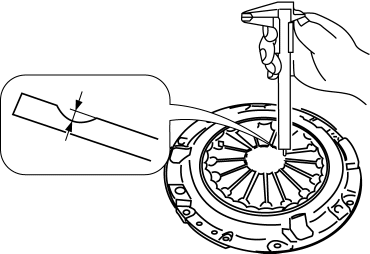
a. Measure the wear of the diaphragm spring fingers.
-
Clutch cover diaphragm spring fingers maximum depth
-
0.6 mm {0.02 in}
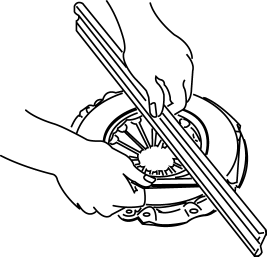
b. Measure the flatness of the pressure plate with a straight edge and a feeler gauge.
-
Maximum clearance of flatness of the pressure plate
-
0.3 mm {0.01 in}
c. Inspect the diaphragm spring fingers for the degree of uniformity in their height.
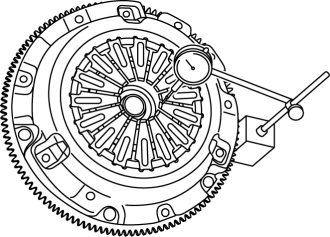
i. Install the clutch cover..
ii. When checking the diaphragm spring fingers, mount a dial gauge on the cylinder block.
iii. Rotate the flywheel and check for misaligned diaphragm spring fingers.
-
Clutch cover diaphragm spring fingers maximum height difference
-
1.0 mm {0.039 in}

 Clutch Disc Inspection [C66 M R]
Operation Inspection
1. Inspect the lining surface for discoloration and grease adhesion.
2. Inspect the torsion spring for weakness and the rivet for looseness.
3. Using a vernier caliper, measu ...
Other materials:
Roof Carrier Bracket Removal/Installation
4SD
1. Disconnect the negative battery cable..
2. Remove the following parts:
a. Sunroof seaming welt (vehicles with sunroof)
b. Front scuff plate.
c. Rear scuff plate.
d. A-pillar trim.
e. B-pillar lower trim.
f. Upper anchor of the front seat belt installation bolt.
g. B-pillar up ...
Tiedown Hooks
CAUTION
Do not use the front and rear tiedown
eyelets for towing the vehicle.
They have been designed only for
securing the vehicle to a transport
vessel during shipping.
Using the eyelets for any other purpose
could result in the vehicle being
damaged.
Tiedown H ...
Auxiliary Jack/Usb Port Inspection
Auxiliary jack inspection
1. Disconnect the negative battery cable..
2. Remove the following parts:
a. Upper panel.
b. Shift lever knob (MTX).
c. Selector lever knob (ATX).
d. Shift panel.
e. Side wall.
f. Console.
g. Auxiliary jack/USB port.
3. Connect a commercially-available pl ...
