
Mazda 3 Service Manual: Electric Variable Valve Timing Actuator Inspection [Skyactiv G 2.0]
WARNING:
-
A hot engine can cause severe burns. Turn off the engine and wait until it is cool before servicing.
CAUTION:
-
Do not disassemble the electric variable valve timing actuator because it is a precision unit.
1. Remove the battery cover..
2. Disconnect the negative battery cable..
3. Remove the plug hole plate..
4. Remove the coolant reserve tank with the hose still connected and set it out of the way..
5. Remove the electric variable valve timing motor/driver..
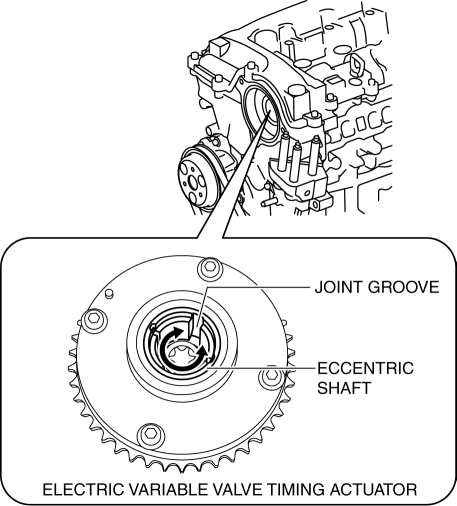
6. Rotate the eccentric shaft of the electric variable valve timing actuator by hand and verify that it rotates smoothly.
-
If it does not rotate smoothly, replace the electric variable valve timing actuator..
NOTE:
-
Hook a finger onto the joint groove of the eccentric shaft to rotate the shaft easily.
-
The eccentric shaft stops rotating at the maximum retard position when it is rotated counterclockwise as viewed from the front, and at the maximum advance position when rotated clockwise.
-
The eccentric shaft rotates 15.8 turns from the maximum retard position to the maximum advance position.
7. Install in the reverse order of removal.
 Compression Inspection [Skyactiv G 2.0]
WARNING:
Hot engines and oil can cause severe burns. Be careful not to burn yourself
during removal/installation of each component.
Fuel vapor is hazardous. It can very easily ignit ...
 Electric Variable Valve Timing Actuator, Hydraulic Variable Valve Timing Actuator
Removal/Installation [Skyactiv G 2.0]
Electric Variable Valve Timing Actuator, Hydraulic Variable Valve Timing Actuator
Removal/Installation [Skyactiv G 2.0]
WARNING:
A hot engine can cause severe burns. Turn off the engine and wait until it
is cool before servicing.
CAUTION:
Do not disassemble the electric variable valve timing ac ...
Other materials:
Sunroof Motor Removal/Installation
1. Disconnect the negative battery cable..
2. Remove the rain sensor cover. (Vehicles with auto light/wiper system).
3. Disconnect the rain sensor connector. (Vehicles with auto light/wiper system)
4. Partially peel back the seaming welts.
5. Remove the following parts:
a. Sunroof seaming ...
Front Fog Light Aiming
CAUTION:
If the front fog light aiming is adjusted with cargo in the vehicle, it may
not adjust correctly. Adjust the front fog light aiming with the vehicle under
the following conditions:
No occupants inside vehicle
Cargo other than spare tire, jack, and tools ...
Electric Variable Valve Timing Motor/Driver Inspection [Skyactiv G 2.0]
WARNING:
A hot engine can cause severe burns. Turn off the engine and wait until it
is cool before servicing.
CAUTION:
Do not disassemble the electric variable valve timing motor/driver because
it is a precision unit.
1. Remove the battery cover..
2. Disconnect th ...
