
Mazda 3 Service Manual: Input/Turbine Speed Sensor Inspection [FS5 A EL]
CAUTION:
-
Water or foreign objects entering the connector can cause a poor connection or corrosion. Be sure not to drop water or foreign objects on the connector when disconnecting it.
On-Vehicle Inspection
1. Perform the following procedures.
a. Remove the battery cover..
b. Disconnect the negative battery cable.
c. Remove the air cleaner component..
d. Disconnect the input/turbine speed sensor connector.
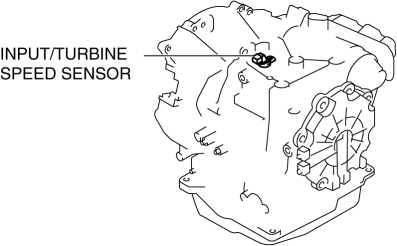
2. Measure the resistance between the input/turbine speed sensor terminals A and B.
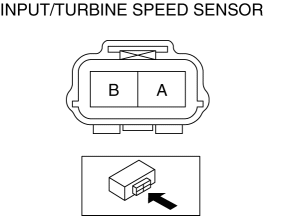
-
If there is any malfunction, replace the input/turbine speed sensor..
-
Input/turbine speed sensor specification
-
250—600 ohms
Off-Vehicle Inspection
1. Measure the resistance between the input/turbine speed sensor terminals A and B.
-
If there is any malfunction, replace the input/turbine speed sensor..
-
Input/turbine speed sensor specification
-
250—600 ohms
 Charge Air Cooler Inspection [Mzr 2.3 Disi Turbo]
1. Remove the charge air cooler cover..
2. Remove the charge air cooler..
3. Remove the air bypass valve..
4. Plug ports A and B.
5. Verify that there is no air leakage when air is sent fr ...
 Input/Turbine Speed Sensor Removal/Installation [FS5 A EL]
CAUTION:
Always use a new bolt. If the removed input/turbine speed sensor installation
bolt is reused, it may cause oil leakage.
A sealant coating is applied to the input/turbine s ...
Other materials:
Tire inflation pressure
Maintaining the correct tire inflation pressure in your Subaru Solterra
is essential for ensuring safety, efficiency, and optimal driving performance.
Tire pressure in the Subaru Solterra should be checked regularly.
While a monthly check is the minimum requirement, SUBARU strongly recommends i ...
Aerodynamic Under Cover No.2 Removal/Installation
Except SKYACTIV-G 2.0
1. Lift up the vehicle.
2. Remove the fasteners and bolts.
3. Move the aerodynamic under cover No.2 in the direction of the arrow shown
in the figure and remove it.
CAUTION:
Be careful not to damage the aerodynamic under cover No.2 during removal.
4. ...
Tire Pressure Adjustment (With TPMS)
1. Use of a digital gauge is recommended for accurate measurement of the air
pressure.
2. Tire pressure lowers gradually as time passes. Due to this, monthly air pressure
inspection is recommended.
3. Perform tire pressure adjustment before driving. (When tires are cold.)
Tire press ...
