
Mazda 3 Service Manual: Passenger Compartment Temperature Sensor Inspection [Full Auto Air Conditioner]
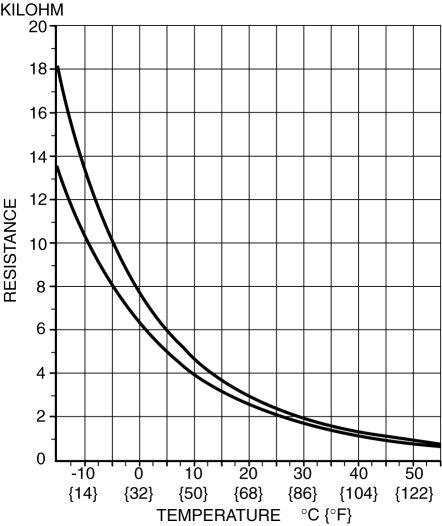
1. Measure the temperature around the passenger compartment temperature sensor and measure the resistance between passenger compartment temperature sensor terminals B and D.
-
If the characteristics of the passenger compartment temperature sensor are not as shown in the graph, replace the passenger compartment temperature sensor.
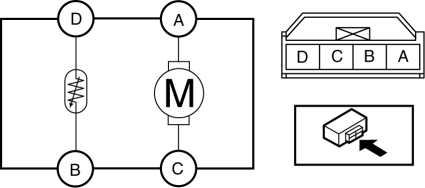
2. Connect battery positive voltage to passenger compartment temperature sensor terminal A and connect terminal C to ground to verify fan operation.
-
If there is any malfunction, replace the passenger compartment temperature sensor.
 Magnetic Clutch Inspection [Manual Air Conditioner]
1. Connect battery to terminal A of magnetic clutch and ground to A/C compressor
body.
SKYACTIV-G 2.0
MZR 2.0
MZR 2.5
2. Verify that the magnetic clutch operates.
If there i ...
 Passenger Compartment Temperature Sensor Removal/Installation [Full Auto Air
Conditioner]
Passenger Compartment Temperature Sensor Removal/Installation [Full Auto Air
Conditioner]
1. Disconnect the negative battery cable..
2. Remove the following parts:
a. Front scuff plate.
b. Front side trim.
c. Dashboard under cover.
d. Upper panel.
e. Shift lever knob (MTX).
f ...
Other materials:
Power Window System Preliminary Inspection [Power Window System]
Manual Open/close Function Inspection
STEP
INSPECTION
ACTION
1
Switch the ignition to ON.
Operate the power window using the manual open/close function on
the power window main switch.
...
Air Intake Actuator Removal/Installation [Full Auto Air Conditioner]
1. Set the air intake mode to FRESH.
2. Disconnect the negative battery cable..
3. Remove the following parts:
a. Front scuff plate (Passenger-side).
b. Front side trim (Passenger-side).
c. Dashboard under cover.
d. Glove compartment.
e. Lower panel (Passenger-side).
f. Shower duct ( ...
Front Stabilizer Removal/Installation [Mzr 2.3 Disi Turbo]
1. Remove the joint cover..
2. Disconnect the steering shaft from the steering gear and linkage..
3. Remove the front crossmember component..
4. Remove in the order indicated in the table.
5. Install in the reverse order of removal.
6. Inspect the wheel alignment and adjust it if necessary ...
