
Mazda 3 Service Manual: Variable Valve Timing Actuator Inspection [Mzr 2.0, Mzr 2.5]
CAUTION:
-
Variable valve timing actuator can not be disassembled because it is a precision unit.
1. Remove the battery cover..
2. Disconnect the negative battery cable..
3. Remove the plug hole plate..
4. Disconnect the wiring harness.
5. Remove the ignition coils..
6. Remove the spark plugs..
7. Remove the ventilation hose.
8. Remove the oil level gauge.
9. Remove the cylinder head cover..
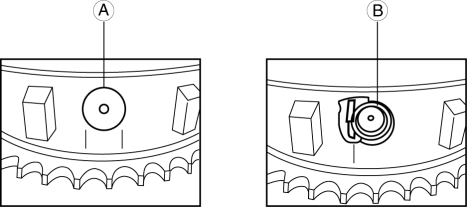
10. Inspect the variable valve timing actuator for damage around the stopper pin cap (A), or a missing stopper pin cap (B), spring and stopper.
-
If no parts are damaged or missing, go to the next step.
-
If any parts are damaged or missing, replace the variable valve timing actuator..
CAUTION:
-
If any parts are damaged or missing, remove the front cover to inspect the timing and oil pump chains and all related components for damage as a result of lost parts. Replace components if necessary.
-
If the lost parts cannot be located in the timing chain area, it will be necessary to remove the oil pan to retrieve them.
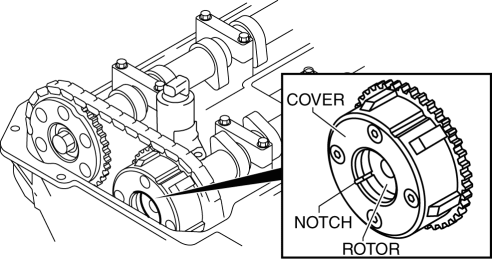
11. Turn the crankshaft clockwise so that the notches on the variable valve timing actuator can be checked.
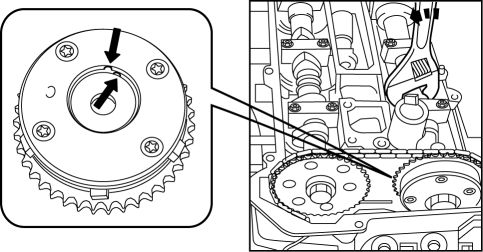
12. Turn the camshaft counterclockwise to align the notches on the variable valve timing actuator.
13. With the notches aligned, turn the camshaft clockwise 30 degrees.
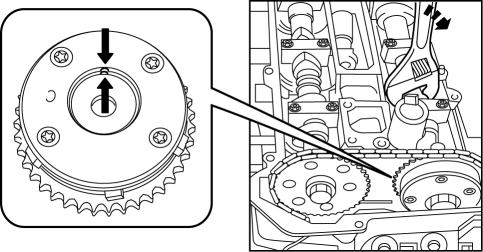
14. Verify the notches again.
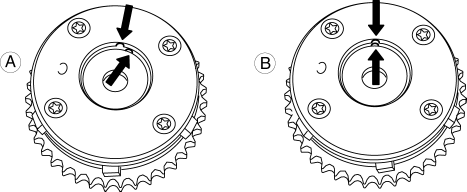
-
A: If the notches are not aligned, replace the variable valve timing actuator..
-
B: If the notches are aligned, there is no problem with the variable valve timing actuator.
NOTE:
-
In some rare cases, the timing chain tensioner ratchet lock may get stuck, which will require the removal of the engine front cover.
15. Install in the reverse order of removal.
 Variable Tumble Solenoid Valve Inspection [Mzr 2.0, Mzr 2.5]
Airflow Inspection
1. Remove the battery cover..
2. Disconnect the negative battery cable..
3. Remove the variable tumble solenoid valve..
4. Inspect airflow between the ports under the followi ...
 Variable Valve Timing Actuator Inspection [Mzr 2.3 Disi Turbo]
CAUTION:
Variable valve timing actuator cannot be disassembled because it is a precision
unit.
1. Remove the battery cover..
2. Disconnect the negative battery cable..
3. Remove t ...
Other materials:
Add-On Non-Genuine Parts and
Accessories
Non-genuine parts and accessories for Mazda vehicles can be found in stores.
These may fit your vehicle, but they are not approved by Mazda for use with
Mazda
vehicles. When you install non-genuine parts or accessories, they could affect
your vehicle's
performance or safety systems; the Maz ...
Information Display Input/Output Check Mode
NOTE:
In this mode, it is possible to verify the items in the following chart.
Check Code Table
Check code
Check item
Related items
01
Information display
Multi information display
...
Front Bumper Disassembly/Assembly
Standard Type
Except SKYACTIV-G 2.0
1. Disassemble in the order indicated in the table.
1
Screw A
2
Guard cover
3
Screw B
4
Fastener C
5
Intake air guide
...
