
Mazda 3 Service Manual: Antenna Feeder No.7 Inspection
1. Disconnect the negative battery cable..
2. Remove the liftgate upper trim..
3. Disconnect the connector A and B..
4. Verify that the continuity between antenna feeder No.7 terminals is as indicated in the table.
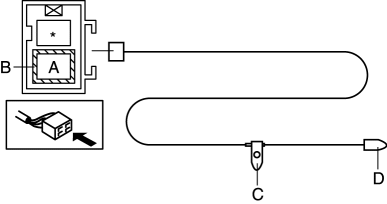
-
If not as indicated in the table, replace antenna feeder No.7.
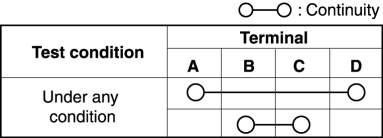
 Antenna Feeder No.6 Removal/Installation
NOTE:
Antenna feeder No.6 is integrated with the vehicle wiring harness.
1. Refer to CAR-NAVIGATION UNIT REMOVAL/INSTALLATION. ...
 Antenna Feeder No.7 Removal/Installation
1. Disconnect the negative battery cable..
2. Remove the liftgate upper trim..
3. Disconnect the connector A.
4. Disconnect the connector B..
5. Remove the bolt.
6. Remove the antenna fe ...
Other materials:
Engine Coolant
Inspecting Coolant Level
WARNING
Do not use a match or live fl ame in the
engine compartment. DO NOT ADD
COOLANT WHEN THE ENGINE IS HOT:
A hot engine is dangerous. If the
engine has been running, parts of the
engine compartment can become very
hot. You could be burned. C ...
Map Light Removal/Installation
1. Disconnect the negative battery cable..
2. Remove the tabs shown in the figure.
3. Pull the map light in the direction of the arrow (1) shown in the figure and
remove the map light while detaching the clips.
4. Disconnect the connector.
5. Install in the reverse order of removal ...
Manual Transaxle Removal/Installation [G66 M R]
CAUTION:
Secure the steering wheel using tape or a cable to prevent the steering shaft
from rotating after disconnecting the steering shaft. If the steering wheel
rotates after the steering shaft and the steering gear and linkage are disconnected,
the internal parts of the clock spr ...
