
Mazda 3 Owners Manual: Driving on Uneven Road
Your vehicle's suspension and underbody can be damaged if driven on rough/uneven roads or over speed bumps at excessive speeds. Use care and reduce speed when traveling on rough/uneven roads or over speed bumps.
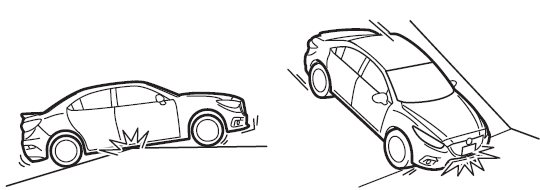
Use care not to damage the vehicle's underbody, bumpers or muffler(s) when driving under the following conditions:
- Ascending or descending a slope with a sharp transition angle
- Ascending or descending a driveway or trailer ramp with a sharp transition angle
This vehicle is equipped with low profile tires allowing class-leading performance and handling. As a result, the sidewall of the tires are very thin and the tires and wheels can be damaged if driven through potholes or on rough/uneven roads at excessive speeds. Use care and reduce speed when traveling on rough/uneven roads or through potholes.
 Overloading
WARNING
Be careful not to overload your vehicle:
The gross axle weight rating (GAWR)
and the gross vehicle weight rating
(GVWR) of the vehicle are on the
Motor Vehicle Safety Sta ...
 Towing
Trailer Towing
Your Mazda is not designed for towing.
Never tow a trailer with your Mazda.
Recreational Towing
An example of "recreational towing" is
towing your vehicle behind a mot ...
Other materials:
Steering Wheel And Column Removal/Installation [Without Advanced Keyless Entry
And Push Button Start System]
WARNING:
Handling the air bag module improperly can accidentally operate (deploy)
the air bag module, which may seriously injure you. Read the service warnings
before handling the air bag module..
1. Remove the driver-side front scuff plate..
2. Remove the driver-side front sid ...
Rear Door Speaker Removal/Installation
1. Disconnect the negative battery cable..
2. Remove the rear door trim..
3. Disconnect the connector.
Without Bose®
With Bose®
4. Remove the screw.
5. Remove the rear door speaker in the direction of the arrow shown in the figure.
Without Bose®
With Bose®
6. Insta ...
Clutch Pedal Position Switch Removal/Installation [C66 M R]
1. Remove the battery cover..
2. Disconnect the negative battery cable..
3. Disconnect the clutch pedal position switch connector.
4. Remove the clutch pedal position switch from the pedal bracket.
5. Insert a new clutch pedal position switch into the pedal bracket hole until
the switc ...
