
Mazda 3 Service Manual: Tweeter Inspection
1. Disconnect the negative battery cable..
2. Remove the inner garnish..
3. Remove the tweeter..
4. Verify the resistance between tweeter terminals.
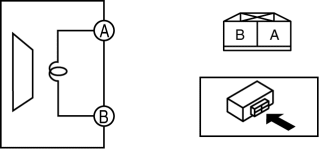
-
If not within the specification, replace the tweeter.
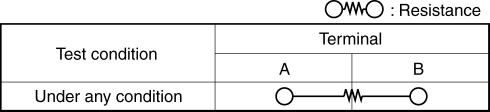
-
Resistance
-
Without Bose®: 3.4—4.6 ohms
-
With Bose®: 3.06—3.74 ohms
 Supplier Identification Procedure [Audio]
Identification Using the Label or Inscribed Lettering
1. Disconnect the negative battery cable..
2. Remove the center panel..
3. Remove the audio unit..
4. Verify the supplier by referring to t ...
 Tweeter Removal/Installation
1. Disconnect the negative battery cable..
2. Remove the inner garnish..
3. Remove the tweeter in the direction of the arrow shown in the figure.
4. Install in the reverse order of removal. ...
Other materials:
Neutral Switch Removal/Installation [G66 M R]
1. Remove the battery cover..
2. Disconnect the negative battery cable.
3. Remove the battery component. (ex: battery, battery tray and PCM component).
4. Remove the aerodynamic under cover No.2..
5. Drain the oil from the transaxle..
6. Remove the neutral switch.
7. Install the neu ...
Troubleshooting
Mazda Bluetooth ® Hands-Free Customer Service
If you have any problems with Bluetooth ® , contact our toll-free customer
service center.
U.S.A.
Canada
Mexico
Bluetooth ® Device pairing, connection problems
*1 Setting which detects the existence of a device external to the Bluet ...
Parking Brake Lever Inspection
Stroke Inspection
1. Pump the brake pedal a few times.
2. Pull the parking brake lever two to three times.
3. Inspect the parking brake stroke by slowly pulling at point A 50 mm {1.97
in} from the end of the parking brake lever with a force of 98 N {10 kgf,
22 lbf} and counting the number o ...
