
Mazda 3 Service Manual: Engine Coolant Temperature (ECT) Sensor Inspection [Mzr 2.0, Mzr 2.5]
ECT Sensor No.1
Resistance inspection
WARNING:
-
When the engine is hot, it can badly burn. Turn off the engine and wait until it is cool before removing the ECT sensor.
1. Remove the battery cover..
2. Disconnect the negative battery cable..
3. Drain the engine coolant..
4. Remove the battery and battery tray..
5. Disconnect the ECT sensor No.1 connector.
6. Remove the ECT sensor No.1..
7. Place the ECT sensor No.1 in water with a thermometer, and heat the water gradually.
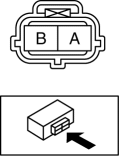
8. Measure the resistance between ECT sensor No.1 terminals A and B.
-
If not as specified, replace the ECT sensor No.1..
|
ECT (°C {°F}) |
Resistance (kilohms) |
|
20 {68} |
Approx. 37.34 |
|
80 {176} |
Approx. 3.84 |
ECT Sensor No.2 Inspection
Resistance inspection
WARNING:
-
When the engine is hot, it can badly burn. Turn off the engine and wait until it is cool before removing the ECT sensor.
1. Remove the battery cover..
2. Disconnect the negative battery cable..
3. Drain the engine coolant..
4. Disconnect the ECT sensor No.2 connector.
5. Remove the ECT sensor No.2..
6. Place the ECT sensor No.2 in water with a thermometer, and heat the water gradually.
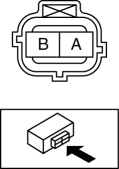
7. Measure the resistance between ECT sensor No.2 terminals A and B.
-
If not as specified, replace the ECT sensor No.2..
|
ECT (°C {°F}) |
Resistance (kilohms) |
|
20 {68} |
Approx. 2.45 |
|
80 {176} |
Approx. 0.318 |
 Crankshaft Position (CKP) Sensor Removal/Installation [Mzr 2.0, Mzr 2.5]
Removal
CAUTION:
When foreign material such as an iron chip is on the CKP sensor, it can cause
abnormal output from the sensor because of flux turbulence and adversely affect
the engine ...
 Engine Coolant Temperature (ECT) Sensor Removal/Installation [Mzr 2.0, Mzr 2.5]
WARNING:
When the engine is hot, it can badly burn. Turn off the engine and wait until
it is cool before removing the ECT sensor.
ECT Sensor No.1
1. Remove the battery cover..
2. D ...
Other materials:
Identification Number Locations
Vehicle Identification Number (VIN)
Engine Type/Number
MZR 2.0, MZR 2.5
MZR 2.3 DISI Turbo
SKYACTIV-G 2.0
...
Front Door Latch Switch Inspection
1. To access the glass installation bolt, position the front door glass so that
the distance from the top of the front door glass to the upper part of the front
beltline molding is approx. 80 mm {3.1 in}.
2. Disconnect the negative battery cable..
3. Remove the following parts:
a. Inne ...
Rear Door Hinge Removal/Installation
1. Disconnect the negative battery cable..
2. Remove the following parts:
a. Rear door.
b. Front scuff plate.
c. Rear scuff plate.
d. B-pillar lower trim.
3. Remove in the order indicated in the table.
1
Bolt
2
Nut
...
