
Mazda 3 Service Manual: Front Combination Light Bracket Replacement
NOTE:
-
Verify that the front combination light is not damaged before using the repair bracket for installation when the original brackets are damaged. If the front combination light component is damaged, replace the light as a single unit.
1. Cut off the front combination light bracket at the locations shown in the figure.
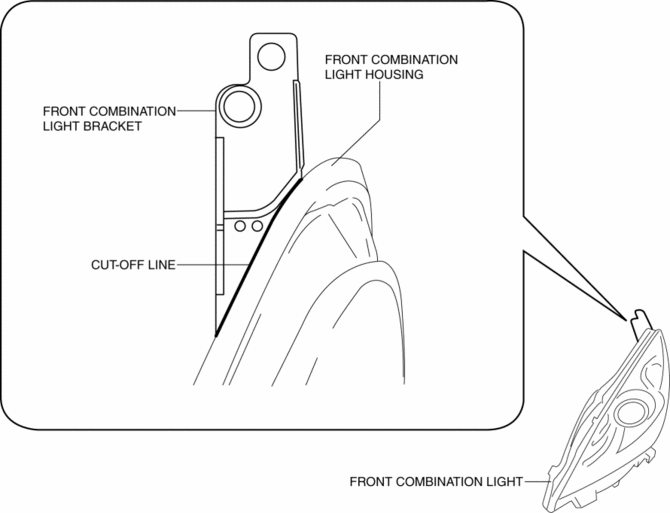
2. Smoothen the cut surfaces using sandpaper so that the repair bracket can be properly installed.
3. Cut the projection at the position shown in the figure.
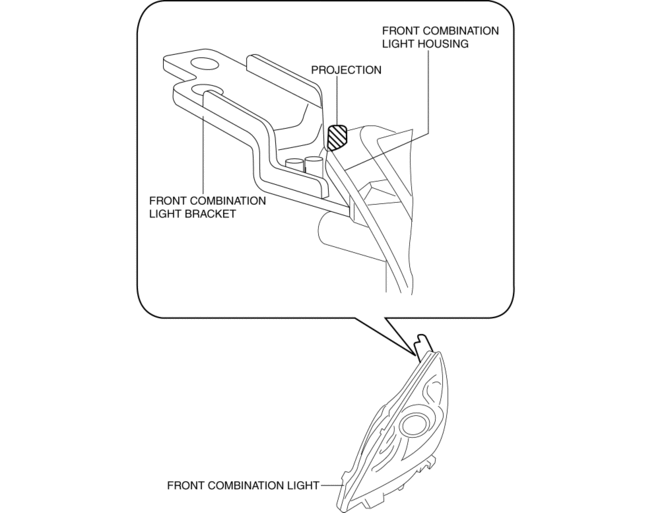
4. After disconnecting the projection, verify that the projection is less than 1mm {0.04 in} from the front combination light housing.
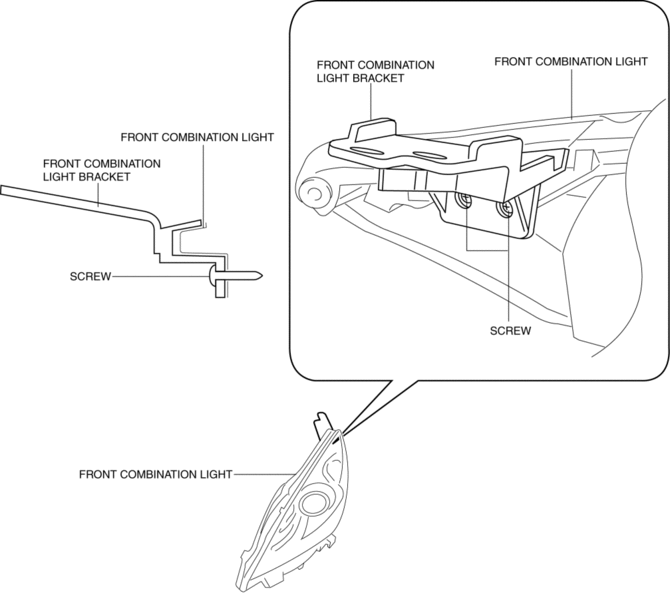
5. Securely attach the repair bracket to the front combination light using the screws.
 Discharge Headlight System Inspection
Discharge headlight inoperative
WARNING:
Incorrect servicing of the discharge headlight bulb could result in electrical
shock. Before servicing the discharge headlight bulb, always refer t ...
 Front Combination Light Removal/Installation
WARNING:
Incorrect servicing of the discharge headlights could result in electrical
shock. Before servicing the discharge headlights, always refer to the discharge
headlight service warn ...
Other materials:
Air Bag Module And Pre Tensioner Seat Belt Deployment Procedures [Standard Deployment
Control System]
WARNING:
A live (undeployed) air bag module or pre-tensioner seat belt may accidentally
operate (deploy) when it is disposed of and cause serious injury. Do not dispose
of a live (undeployed) air bag module and pre-tensioner seat belt. If the SSTs
(Deployment tool and Adapter harn ...
Air Mix Actuator Inspection [Full Auto Air Conditioner]
CAUTION:
If the lever position exceeds the operation range shown in the figure, the
circuit in the actuator could be damaged. Always perform an actuator operation
inspection with the lever movement within the range shown in the figure.
Driver-side
1. Connect battery positive vol ...
Rear Window Glass Removal
4SD
1. Disconnect the negative battery cable.
2. Remove the following parts:
a. Rear seat cushion.
b. Rear scuff plate.
c. Rear side seat back.
d. C–pillar trims.
e. Rear package trim.
f. Tire house trims.
3. Remove the fasteners.
4. Set the headliner out of the way.
5. Di ...
