
Mazda 3 Owners Manual: Hazard Warning Flasher
The hazard warning lights should always be used when you stop on or near a roadway in an emergency.
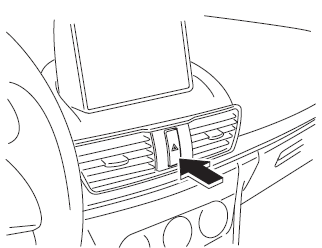
The hazard warning lights warn other drivers that your vehicle is a traffic hazard and that they must take extreme caution when near it.

Depress the hazard warning flasher and all the turn signals will flash. The hazard warning indicator lights in the instrument cluster flash simultaneously.
NOTE
- The turn signals do not work when the hazard warning lights are on.
- Check local regulations about the use of hazard warning lights while the vehicle is being towed to verify that it is not in violation of the law.
 Rear Window Defogger
The rear window defogger clears fog from
the rear window.
The ignition must be switched ON to use
the defogger.
Press the switch to turn on the rear
window defogger. The rear window
defogger ...
 HomeLink Wireless Control
System*
HomeLink Wireless Control
System*
NOTE
HomeLink and HomeLink house are
registered trademarks of Johnson
Controls.
The HomeLink system replaces up to
3 hand-held transmitters with a single
built-in component in the auto-dimming
...
Other materials:
Vacuum Line Inspection
MZR 2.0, MZR 2.5, MZR 2.3 DISI Turbo
1. Remove the vacuum hose..
2. Verify that air can be blown from the power brake unit side of the vacuum
hose towards the intake manifold side, and that air cannot be blown in the opposite
direction.
If there is any malfunction of the inner che ...
Recording of Vehicle Data
This vehicle is equipped with a computer which records the following main
vehicle data
related to vehicle controls, operation, and other driving conditions.
Recorded data
Vehicle conditions such as engine speed and vehicle speed
Driving operation conditions such as accelerator and brake pe ...
Hood Release Cable Removal/Installation
1. Disconnect the negative battery cable..
2. Remove the battery tray..
3. Remove the Front mudguard (LH)..
4. Remove the hood release cable from clips A.
5. Remove the clips B.
6. Disconnect the hood latch from the hood release cable.
7. Remove the hood release cable from outside of ...
