
Mazda 3 Owners Manual: Interior Equipment (View A)
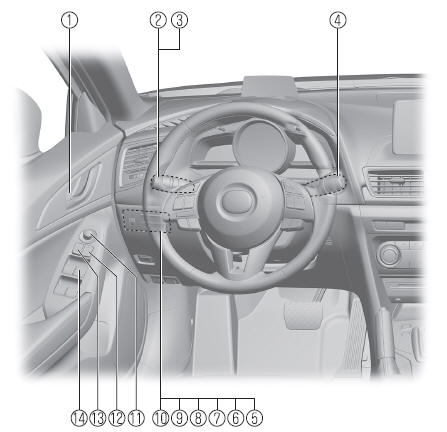
- Door-lock knob
- Turn and lane-change signal
- Lighting control
- Wiper and washer lever
- DSC OFF switch
- Tire pressure monitoring system set switch
- LDWS switch
- AFS OFF switch
- BSM OFF switch
- Headlight leveling switch
- Outside mirror switch
- Door-lock switch
- Power window lock switch
- Power window switches
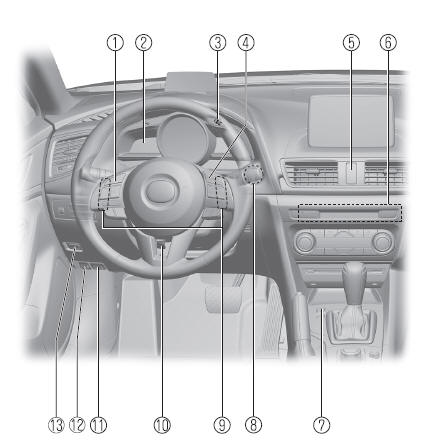
- Audio control switches
- Instrument cluster
- Dashboard illumination knob
- Cruise control switches
- Hazard warning flasher switch
- Seat warmer switches
- Drive selection switch
- Push button start
- Steering shift switches
- Lock release lever
- Hood release handle
- Remote fuel-filller lid release
- Trunk release button

 Interior Equipment (View B)
SRS air bags
Active driving display
Climate control system
Rear window defogger switch
Audio system
CD player
Accessory sockets
External input terminal
Commander switch
Shift ...
Other materials:
Entertainment Personalization Features Setting Procedure
Welcome Mode ON/OFF Setting
NOTE:
WELCOME mode is controlled by the instrument cluster. Refer to the instrument
cluster description.
1. Refer to INSTRUMENTATION/DRIVER INFO. PERSONALIZATION FEATURES SETTING PROCEDURE.
Welcome Sound ON/OFF Setting
1. Switch the ignition to ACC o ...
Wrench Indicator Light
When the ignition is switched ON, the
wrench indicator light is illuminated and
then turns off after a few seconds.
The wrench indicator light is illuminated
when the preset maintenance period
arrives. Verify the content and perform
maintenance.
Refer to Maintenance Monitor on .
Low ...
Rear Center Seat Belt Removal/Installation
CAUTION:
The ELR (emergency locking retractor) has a spring that will unwind if the
retractor cover is removed. The spring cannot be rewound by hand. If this occurs,
the ELR will not work properly. Therefore, do not disassemble the retractor.
4SD
1. Remove the following parts:
...
