
Mazda 3 Service Manual: Hood Latch Switch Inspection
1. Disconnect the negative battery cable..
2. Remove the hood latch..
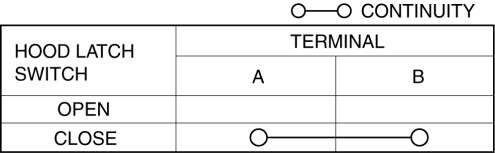
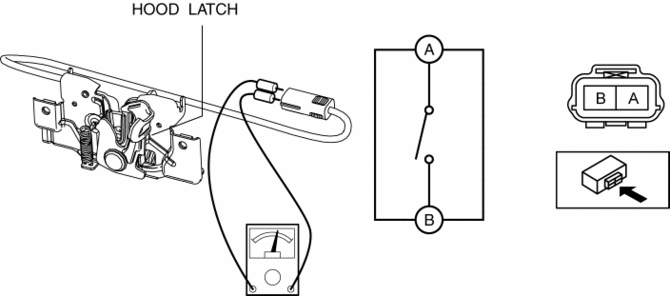
3. Verify that the continuity is as indicated in the table.
-
If not as indicated in the table, replace the hood latch.
NOTE:
-
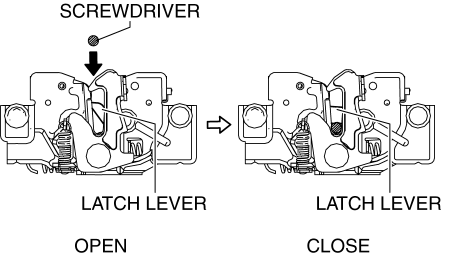
Press the latch lever in using a flathead screwdriver to inspect the closed condition of the hood latch switch.
 Hood Latch And Release Lever Removal/Installation
Hood latch
1. Open the hood.
2. Disconnect the negative battery cable..
3. Disconnect the hood latch switch connector. (vehicles with theft-deterrent
system)
4. Remove the bolts.
5. ...
 Hood Release Cable Removal/Installation
1. Disconnect the negative battery cable..
2. Remove the battery tray..
3. Remove the Front mudguard (LH)..
4. Remove the hood release cable from clips A.
5. Remove the clips B.
6. Disco ...
Other materials:
Child Restraint Seat Anchor Removal/Installation
4SD
1. Remove the cover.
2. Remove the bolt and child-restraint seat anchor.
3. Install in the reverse order of removal.
5HB
1. Remove the trunk end trim..
2. Remove the bolt and child-restraint seat anchor.
3. Install in the reverse order of removal. ...
AUX/USB/iPod mode
Audio can be heard from the vehicle's
speakers by connecting a commerciallyavailable
portable audio unit to the
auxiliary jack.
A commercially-available, non-impedance
(3.5 ) stereo mini plug cable is required.
Contact an Authorized Mazda Dealer for
details.
In addition, audio can be p ...
Generator Disassembly/Assembly [Mzr 2.0, Mzr 2.5]
CAUTION:
Melt the solder quickly, otherwise the diodes (rectifier) and regulator will
be damaged by excessive heat.
1. Disassemble in the order indicated in the table.
2. Assemble in the reverse order of disassembly.
MZR 2.0
1
Rotor component
...
