
Mazda 3 Service Manual: Malfunctioning Wheel Unit Identification
NOTE:
-
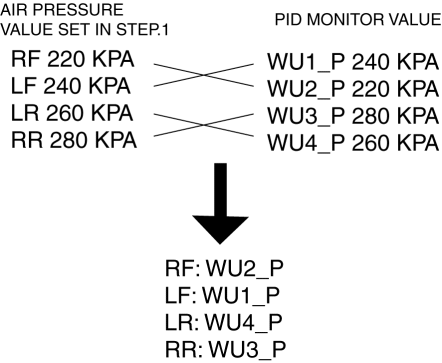
The tire pressure monitoring system (TPMS) does not identify the location of the malfunctioning wheel unit on the vehicle (RF, LF, LR, RR). The TPMS identifies each wheel unit as No.1, No.2, No.3 and No.4. In order to identify the location of the wheel unit, perform the following procedure.
1. Adjust the air pressure as follows:
-
RF: 220 kPa {2.2 kgf/cm2, 32 psi}
-
LF: 240 kPa {2.4 kgf/cm2, 35 psi}
-
LR: 260 kPa {2.6 kgf/cm2, 38 psi}
-
RR: 280 kPa {2.8 kgf/cm2, 40 psi}
2. Switch the ignition to off.
3. Connect the M-MDS to the DLC-2.
4. Switch the ignition to ON.
5. Drive the vehicle at a speed of 25 km/h {15.5 mph} or more
for 2 min or more.
6. Select the following PIDs using the M-MDS, and monitor them.
-
WU1_P
-
WU2_P
-
WU3_P
-
WU4_P
7. Determine which wheel unit identification code matches which wheel and tire by comparing the PID monitor values with the air pressure values set in Step 1.
 Wheels, Tires
...
 Parameter Setting Procedure When Tire Size Is Changed
CAUTION:
If the wheel and tire sizes are changed, a discrepancy with the speedometer
needle whereby it exceeds the allowable range could result in a malfunction.
If the wheel and tire si ...
Other materials:
Battery Removal/Installation [Mzr 2.0, Mzr 2.5]
1. Remove in the order indicated in the table.
2. Install in the reverse order of removal.
1
Battery cover
(See Battery Cover Removal Note.)
(See Battery Cover Installation Note.)
2
Negative battery cable
3
...
Shift Lock System Inspection
Shift-Lock System Inspection
1. Switch the ignition to ON.
2. Shift the selector lever to the P position.
3. Perform the following procedures to inspect the shift-lock system.
If there is any malfunction, inspect the shift-lock solenoid and P position
switch..
a. Verify that th ...
Cruise Control Switch Inspection [Mzr 2.0, Mzr 2.5]
1. Remove the battery cover..
2. Disconnect the negative battery cable and wait for 1 min or more..
3. Remove the driver–side air bag module..
4. Disconnect the clock spring connector (part wiring harness-side).
5. Measure the resistance between clock spring terminals K and M (part wiring ...
