
Mazda 3 Service Manual: Parameter Setting Procedure When Tire Size Is Changed
CAUTION:
-
If the wheel and tire sizes are changed, a discrepancy with the speedometer needle whereby it exceeds the allowable range could result in a malfunction. If the wheel and tire sizes are changed, perform the following procedure to change the tire size parameter setting.
-
The same parameters should be set in “Tire dimension”, “Tire Circumference”, and “Tire Size”.
1. Connect the M-MDS to DLC-2.
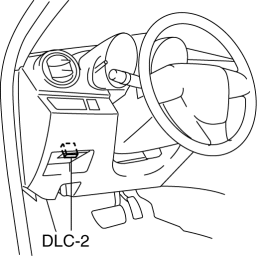
2. After the vehicle is identified, select the following item from the initialization screen of the M-MDS.
-
Select “Module Programming”.
3. Select the items from the screen menu.
-
Select “Programmable Parameters”.
-
Select “Tire Size”.
4. Select an item name, and then select the option.
-
Select “Tire Size”.
-
Tire dimension (195/70R15, 205/50R17, 195/65R15, 205/55R16, 225/40R18)
-
Tire Circumference (195/70R15, 205/50R17, 195/65R15, 205/55R16, 225/40R18)
5. Select the items from the screen menu.
-
Select “Programmable Parameters”.
-
Select “Tire Size/Axle Ratio”.
6. Select an item name, and then select the option.
-
Select “Tire Size/Axle Ratio”.
-
Tire Size (195/70R15, 225/40R18, 195/65R15, 205/50R17, 205/55R16)
 Malfunctioning Wheel Unit Identification
NOTE:
The tire pressure monitoring system (TPMS) does not identify the location
of the malfunctioning wheel unit on the vehicle (RF, LF, LR, RR). The TPMS identifies
each wheel unit as N ...
 Tire House Trim Removal/Installation
4SD
1. Remove the rear seat cushion..
2. Remove the rear scuff plate..
3. Partially peel back the seaming welt.
4. Remove the fastener.
5. Pull the tire house trim in the direction of arrow s ...
Other materials:
Ignition Switch Removal/Installation [Without Advanced Keyless Entry And Push
Button Start System]
1. Disconnect the negative battery cable..
2. Remove the column cover..
3. Detach the tab.
4. Pull the pin in the direction of the arrow shown in the figure and release
the lock.
5. Disconnect the ignition switch connector and key interlock solenoid connector.
6. Remove the ...
Fuse Replacement
Replacing the fuses on the vehicle's left side
If the electrical system does not work, first
inspect the fuses on the vehicle's left side.
Make sure the ignition is switched off,
and other switches are off.
Open the fuse panel cover.
Pull the fuse straight out with the
fuse pul ...
Brake Fluid Pressure Sensor Inspection
1. Switch the ignition to off.
2. Install the SSTs to the master cylinder (secondary side) as shown in
the figure.
NOTE:
When installing the SST (49 D043 0A0) to the master cylinder, use
a commercially available flare nut wrench (flare nut across flat 12 mm {0.47
in}).
...
