
Mazda 3 Owners Manual: Parking in an Emergency
The hazard warning lights should always be used when you stop on or near a roadway in an emergency
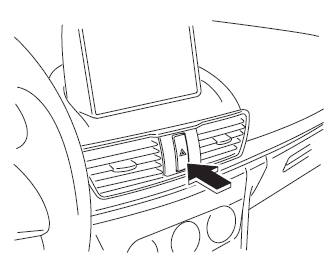
The hazard warning lights warn other drivers that your vehicle is a traffic hazard and that they must take extreme caution when near it.

Depress the hazard warning flasher and all the turn signals will flash. The hazard warning indicator lights in the instrument cluster flash simultaneously.
NOTE
- The turn signals do not work when the hazard warning lights are on.
- Check local regulations about the use of hazard warning lights while the vehicle is being towed to verify that it is not in violation of the law.
 If Trouble Arises
Helpful information on what to do if a problem arises with the vehicle. ...
 Flat Tire
...
Other materials:
Rear Window Glass Removal
4SD
1. Disconnect the negative battery cable.
2. Remove the following parts:
a. Rear seat cushion.
b. Rear scuff plate.
c. Rear side seat back.
d. C–pillar trims.
e. Rear package trim.
f. Tire house trims.
3. Remove the fasteners.
4. Set the headliner out of the way.
5. Di ...
ABS HU/CM Removal/Installation
WARNING:
If the ABS HU/CM configuration is not completed, it could result in an unexpected
accident due to the ABS being inoperative. If the ABS HU/CM or ABS CM is replaced,
always use the automatic configuration function so that the ABS operation conditions
are correct.
CAUTI ...
Using the charging schedule function
The Subaru Solterra allows AC charging to be conveniently scheduled
in advance, enabling drivers to optimize charging times according to their daily
routine and energy cost preferences.
■ Calendar settings
The charging schedule of the Subaru Solterra operates based on the date and time
con ...
