
Mazda 3 Service Manual: Quarter Window Glass Removal
1. Remove the following parts:
a. Rear seat cushion.
b. Rear scuff plate.
c. Tire house trim.
d. Trunk side upper trim.
e. C-pillar trim.
2. Apply protective tape along the edge of the body and the quarter window glass.
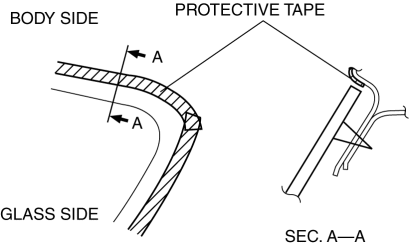
NOTE:
-
For the areas of the sealant that are difficult to cut, use the piano wire and follow the procedure under “Reusing Windshield”.
WARNING:
-
Using the piano wire with bare hands can cause injury. Always wear gloves when using the
piano wire.
3. Avoiding the pin on the inside of the vehicle, insert the piano wire which has been cut to sufficient length.
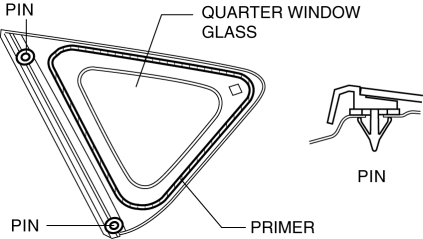
4. Wind each end of the piano wire around a bar.
NOTE:
-
Use a long sawing action to spread the work over the whole length of the piano wire to prevent it from breaking due to localized heating.
5. Secure one end of the piano wire, and while pulling the other end, cut the sealant around the quarter window glass.
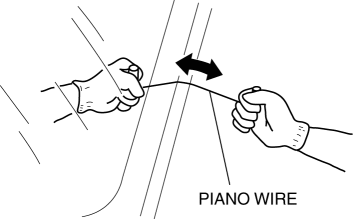
6. Pull the quarter window glass outward and detach the pins from the body.
7. If a pin or fastener is damaged, remove it.
NOTE:
-
Before removing the pins or spacers from the quarter window glass, place alignment marks on the quarter window glass.
 Quarter Window Glass Installation
WARNING:
Using a razor with bare hands can cause injury. Always wear gloves when using
a razor.
CAUTION:
If a door is opened or closed when all the window glass is closed, the ...
 Rear Door Glass Removal/Installation
1. Fully lower the rear door glass.
2. Disconnect the negative battery cable..
3. Remove the rear door trim..
4. Remove the rear door speaker..
5. Remove the rear power window motor..
6. Rem ...
Other materials:
Front Door Speaker Removal/Installation
1. Disconnect the negative battery cable..
2. Remove the inner garnish..
3. Remove the front door trim..
4. Disconnect the connector.
Without Bose®
With Bose®
5. Remove the screw.
6. Remove the front door speaker in the direction of the arrow shown in the figure.
Without Bos ...
Pilot Bearing Inspection [A26 M R]
CAUTION:
Secure the steering wheel using tape or a cable to prevent the steering shaft
from rotating after disconnecting the steering shaft. If the steering wheel
rotates after the steering shaft and the steering gear and linkage are disconnected,
the internal parts of the clock spr ...
Adjusting the Vents
Directing airflow
To adjust the direction of airflow, move the
adjustment knob.
NOTE
When using the air conditioner under
humid ambient temperature conditions,
the system may blow fog from the vents.
This is not a sign of trouble but a result
of humid air being suddenly cooled.
The ...
