
Mazda 3 Service Manual: Rear Buckle Removal/Installation
Rear Buckle (RH) and Rear Buckle (Center)
1. Remove the rear seat cushion..
2. Remove the bolt.
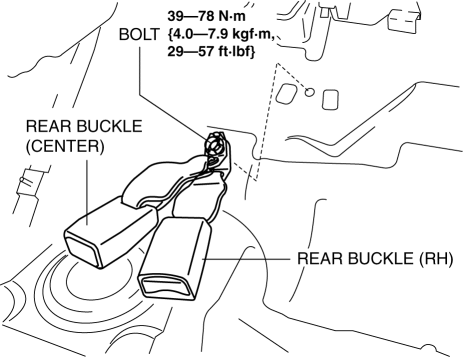
3. Remove the rear buckle (RH) and rear buckle (center).
4. Install in the reverse order of removal.
Rear Buckle (LH)
1. When removing or installing the rear buckle (LH), refer to the rear center seat belt removal/installation procedure..
Rear Buckle Installation Note
-
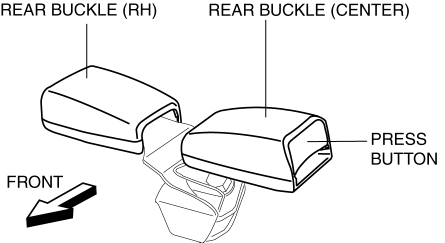
After installing the rear seat cushion, position the rear buckle (RH) and rear buckle (center) with the rear buckle (RH) and rear buckle (center) buttons facing upward as shown in the figure.
 Front Seat Belt Removal/Installation [Two Step Deployment Control System]
WARNING:
Handling the front seat belt (pre-tensioner seat belt) improperly can accidentally
deploy the pre-tensioner seat belt, which may seriously injure you. Read the
air bag system ...
 Rear Seat Belt Removal/Installation
CAUTION:
The ELR (emergency locking retractor) has a spring that will unwind if the
retractor cover is removed. The spring cannot be rewound by hand. If this occurs,
the ELR will not w ...
Other materials:
Mass Air Flow (MAF) Sensor/Intake Air Temperature (Iat) Sensor No.1 Removal/Installation
[Skyactiv G 2.0]
CAUTION:
Be careful not to hit the sensor element or allow foreign matter to get on
it during sensor removal/installation. If the sensor element is hit or foreign
matter gets on it, an error may occur in the sensor output signal resulting
in deterioration in the engine control.
...
ABS HU/CM Removal/Installation
WARNING:
If the ABS HU/CM configuration is not completed, it could result in an unexpected
accident due to the ABS being inoperative. If the ABS HU/CM or ABS CM is replaced,
always use the automatic configuration function so that the ABS operation conditions
are correct.
CAUTI ...
No.2 Car Navigation System Does Not Operation [Car Navigation System]
2
Even if the map screen is touched, the car-navigation system cannot be
operated
Possible DTC
—
POSSIBLE CAUSE
Audio unit malfunction (bad LCD panel)
Car-navigation unit malfunct ...
