
Mazda 3 Service Manual: Rear Door Checker Removal/Installation
1. Fully close the rear door glass.
2. Disconnect the negative battery cable..
3. Remove the rear door trim..
4. Remove the rear door speaker..
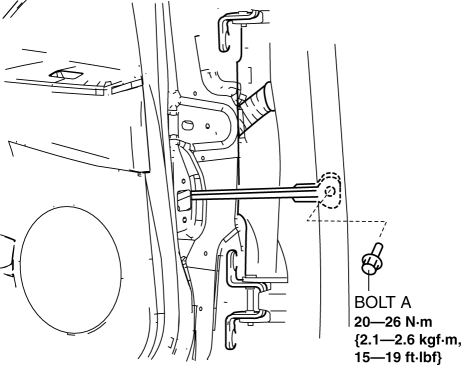
5. Remove the bolt A.
6. Remove the bolts B.
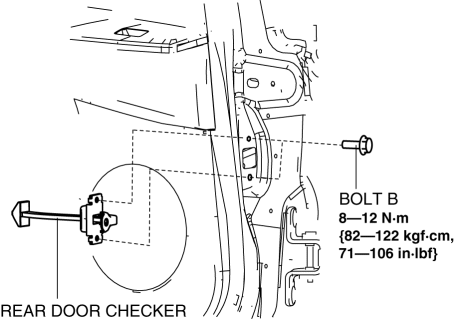
7. Pull out the rear door checker from the rear door speaker installation hole.
8. Install in the reverse order of removal.
 Liftgate Upper Trim Removal/Installation
1. Detach tab while pulling the liftgate upper trim in the direction of the arrow
(1) shown in the figure, then detach clips and pin while pulling in the direction
of the arrow (2).
2. Detac ...
 Rear Door Hinge Removal/Installation
1. Disconnect the negative battery cable..
2. Remove the following parts:
a. Rear door.
b. Front scuff plate.
c. Rear scuff plate.
d. B-pillar lower trim.
3. Remove in the order indicated ...
Other materials:
Floor Covering Removal/Installation
1. Disconnect the negative battery cable..
2. Remove the following parts:
a. Front seat.
b. Audio amplifier (Vehicles with Bose®).
c. Front scuff plate.
d. Joint cover.
e. Front side trim.
f. Fuel-filler lid opener lever bezel.
g. Selector lever knob (ATX).
h. Shift lever knob (MT ...
Audio System
NOTE:
“iPod” is a registered trademark of Apple Inc. in the United States and other
countries.
Outline
An Auxiliary jack/USB port unit has been adopted which can connect to commercially-available
portable audio/USB devices/iPod, and output sound from the speakers via t ...
Charging tips
This section provides practical guidance on how to efficiently use
the charging system of the Subaru Solterra, as well as how to monitor and interpret
important charging-related information for optimal performance.
Systematically charging
To maximize the usability and convenience of the Subaru ...
