
Mazda 3 Service Manual: Receiver/Drier Removal/Installation
MZR 2.0, MZR 2.5, SKYACTIV-G 2.0
1. Disconnect the negative battery cable..
2. Discharge the refrigerant..
3. Remove the aerodynamic under cover No.2..
4. Remove the aerodynamic under cover No.1..
5. Remove the front bumper..
6. Disconnect the block joint type pipes by grasping female side of the block with hand holding firmly then loosen the connection bolt A.
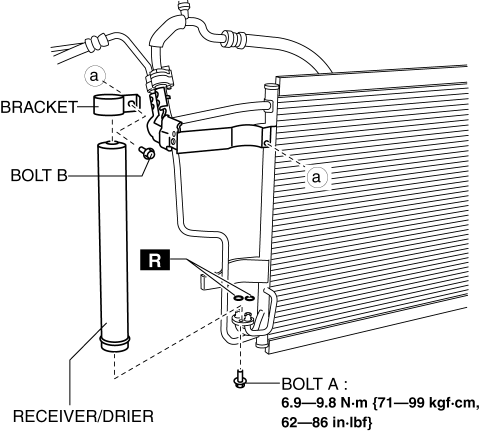
7. Remove the bolt B.
8. Remove the bracket.
9. Remove the receiver/drier. Do not allow compressor oil to spill.
CAUTION:
-
If moisture or foreign material enters the refrigeration cycle, cooling ability will be lowered and abnormal noise will occur. Always immediately plug all open fittings after removing any refrigeration cycle parts to keep moisture or foreign material out of the cycle.
10. Install in the reverse order of removal.
11. Perform the refrigerant system performance test..
MZR 2.3 DISI Turbo
1. Disconnect the negative battery cable..
2. Discharge the refrigerant..
3. Remove the aerodynamic under cover No.2..
4. Remove the aerodynamic under cover No.1..
5. Remove the front bumper..
6. Disconnect the block joint type pipes by grasping female side of the block with hand holding firmly then loosen the connection bolt A.
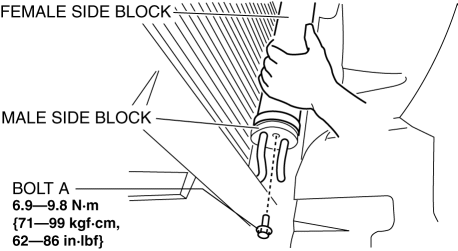
7. Remove the bolt B.
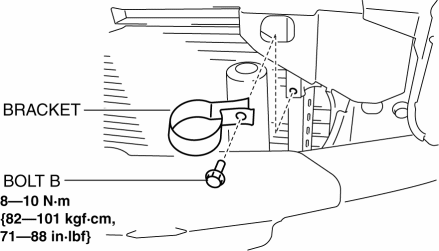
8. Remove the bracket.
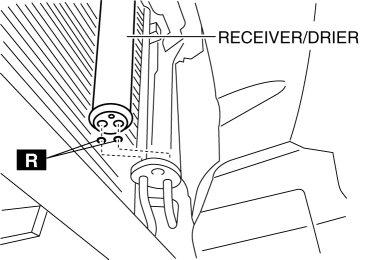
9. Remove the receiver/drier. Do not allow compressor oil to spill.
CAUTION:
-
If moisture or foreign material enters the refrigeration cycle, cooling ability will be lowered and abnormal noise will occur. Always immediately plug all open fittings after removing any refrigeration cycle parts to keep moisture or foreign material out of the cycle.
10. Install in the reverse order of removal.
11. Perform the refrigerant system performance test..
 Power Metal Oxide Semiconductor Field Effect Transistor (Power Mos Fet) Removal/Installation
[Full Auto Air Conditioner]
Power Metal Oxide Semiconductor Field Effect Transistor (Power Mos Fet) Removal/Installation
[Full Auto Air Conditioner]
1. Disconnect the negative battery cable..
2. Remove the dashboard under cover..
3. Disconnect the connector.
4. Remove the screw.
5. Remove the power MOS FET.
6. Install in the reverse ...
 Evaporator Temperature Sensor Inspection [Full Auto Air Conditioner]
NOTE:
Inspect the evaporator temperature sensor when it is installed to the A/C
unit.
1. Set the fan speed MAX HI.
2. Set the temperature control at MAX COLD.
3. Set the RECIRCULA ...
Other materials:
Battery Electric Vehicle driving tips
When operating the Subaru Solterra, it is important to understand
that battery electric vehicles behave differently from conventional gasoline-powered
cars. At sustained high speeds—such as on highways or freeways—the efficiency
of electricity consumption decreases, which can significantly ...
Initial Learning [Fw6 A EL]
Introduction
If the control valve body and oil pressure switch are replaced, always perform
the initial learning. If the initial learning is not completed, engine rev-up
may occur or shift shock may increase. DTC P06B8:00 is displayed while the initial
learning has not been implement ...
Replacing Windshield Wiper Blades
When the wipers no longer clean well, the
blades are probably worn or cracked.
Replace them.
CAUTION
To prevent damage to the wiper arms
and other components, do not try to
sweep the wiper arm by hand.
NOTE
When raising both windshield wiper arms,
raise the driver's side ...
