
Mazda 3 Owners Manual: Steering Wheel
| WARNING
Never adjust the steering wheel while
the vehicle is moving:
Adjusting the steering wheel while
the vehicle is moving is dangerous. Moving it can very easily cause the driver to abruptly turn to the left or right. This can lead to loss of control or an accident. |
Steering Wheel Adjustment
To change the angle or length of the steering wheel:
- Stop the vehicle, and then pull down the lock release lever under the steering column.
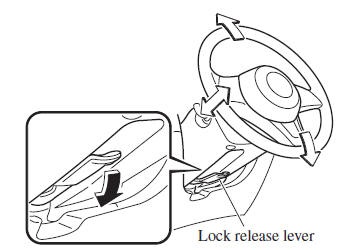
- Tilt the steering wheel and/or adjust the steering column length to the desired positions, then push the lever up to lock the column.
- Attempt to push the steering wheel up and down to make sure it's locked before driving.
 Fuel-Filler Lid and Cap
WARNING
When removing the fuel-fi ller cap,
loosen the cap slightly and wait for any
hissing to stop, then remove it:
Fuel spray is dangerous. Fuel can
burn skin and eyes and cau ...
 Mirrors
Before driving, adjust the inside and
outside mirrors. ...
Other materials:
Assist Handle Removal/Installation
Assist Handle Removal
1. Insert a flathead screwdriver into the service hole and remove the assist
handle covers.
2. Remove the assist handle in the direction of the arrow (1) and (2), while
detach the clip.
NOTE:
Remove the assist handle by shaking it up and down.
Ass ...
ABS HU/CM Removal/Installation
WARNING:
If the ABS HU/CM configuration is not completed, it could result in an unexpected
accident due to the ABS being inoperative. If the ABS HU/CM or ABS CM is replaced,
always use the automatic configuration function so that the ABS operation conditions
are correct.
CAUTI ...
Shift Lock System Inspection
Shift-Lock System Inspection
1. Switch the ignition to ON.
2. Shift the selector lever to the P position.
3. Perform the following procedures to inspect the shift-lock system.
If there is any malfunction, inspect the shift-lock solenoid and P position
switch..
a. Verify that th ...
