
Mazda 3 Service Manual: Sunroof Unit Removal/Installation
CAUTION:
-
If the sunshade is forced close while the sunroof is open, the sunshade could be damaged.
1. Disconnect the negative battery cable..
2. Remove the rain sensor cover. (Vehicles with auto light/wiper system).
3. Disconnect the rain sensor connector. (Vehicles with auto light/wiper system)
4. Partially peel back the seaming welts.
5. Remove the following parts:
a. Sunroof seaming welt
b. A–pillar trim.
c. Front scuff plate.
d. Rear scuff plate.
e. B-pillar lower trim.
f. Upper anchor of the front seat belt.
g. B-pillar upper trim.
h. Rear seat cushion.
i. Tire house trim.
j. Trunk side upper trim (5HB).
k. C–pillar trim.
l. Map light.
m. Sunvisor.
n. Assist handle.
o. Headliner.
6. Disconnect the front and rear drain hose from the sunroof frame.
7. Disconnect the sunroof motor connector.
8. Remove the bolts.
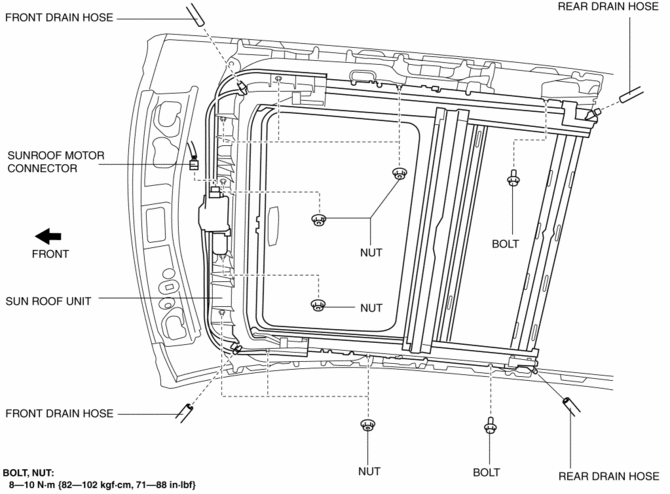
9. Remove the nuts, and then remove the sunroof unit.
10. Install in the reverse order of removal.
11. Adjust the glass panel..
 Sunroof Unit Disassembly/Assembly
NOTE:
If the guide or sunroof motor is removed, the glass panel will not be positioned
properly after the re-installation. To ensure proper positioning of the glass
panel, place alignmen ...
 Sunroof Switch Inspection
NOTE:
The sunroof switch is together with the front map light.
1. Disconnect the negative battery cable..
2. Remove the map light from the headliner..
3. Inspect for continuity betwe ...
Other materials:
Brake Hose (Rear) Removal/Installation [Mzr 2.0, Skyactiv G 2.0]
CAUTION:
If the brake hose is installed to the caliper on the vehicle, the tool cannot
be installed correctly resulting in brake fluid leakage due to improper installation.
Therefore, remove the caliper and brake hose as a single unit when removing
the brake hose, and tighten the br ...
Vehicle load limits
The Subaru Solterra vehicle load limits define the maximum allowable
weight parameters, including total load capacity, seating capacity, TWR (Trailer
Weight Rating), and cargo capacity, all of which must be respected for safe operation.
Understanding and correctly applying these limits in the S ...
Parking in an Emergency
The hazard warning lights should always
be used when you stop on or near a
roadway in an emergency
The hazard warning lights warn other
drivers that your vehicle is a traffic hazard
and that they must take extreme caution
when near it.
Depress the hazard warning flasher and
all the t ...
