
Mazda 3 Service Manual: Trunk Compartment Light Bulb Removal/Installation
1. Disconnect the negative battery cable..
2. Disengage the tabs by pressing both ends of the lens in the directions indicated by the arrows and remove the lens.
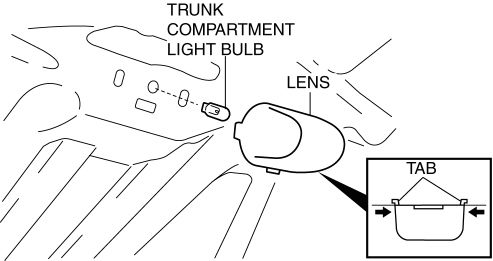
3. Remove the trunk compartment light bulb.
4. Install in the reverse order of removal.
 Trunk Board Removal/Installation
1. Remove the trunk mat in the direction of arrow shown in the figure.
2. Remove the trunk board in the direction of arrow shown in the figure.
3. Install in the reverse order of removal. ...
 Trunk End Trim Removal/Installation
4SD
1. Remove the trunk mat..
2. Remove the trunk board..
3. Remove the fasteners.
4. Pull the trunk end trim indicated in the arrow shown in the figure, then detach
clips A, pins B, pin C, D ...
Other materials:
Remote Air Conditioning System
In the Subaru Solterra, the Remote Air Conditioning System utilizes
energy stored in the traction battery to allow the climate control system to be
activated remotely, providing a comfortable cabin environment before entering the
vehicle.
When the Subaru Solterra is connected to a charging ...
Automatic Transaxle Fluid (ATF) Inspection [Fw6 A EL]
CAUTION:
If the ATF level is not within the specification or ATF is not adhering to
the dipstick after warming up the engine, do not drive the vehicle. Otherwise,
the transaxle could be damaged.
ATF Level Inspection
1. Remove aerodynamic undercover No.2..
2. Remove the dipstic ...
Operational Range
The system operates only when the driver
is in the vehicle or within operational
range while the key is being carried.
Starting the Engine
NOTE
Starting the engine may be possible
even if the key is outside of the vehicle
and extremely close to a door and
window, however, always start ...
