
Mazda 3 Service Manual: Trunk Lid Removal/Installation
WARNING:
-
Removing the trunk lid stay damper without supporting the trunk lid can be dangerous. The trunk lid may fall and injure you. Be sure to open the trunk lid completely and support it securely before removing the trunk lid stay damper.
1. Disconnect the negative battery cable..
2. Remove the following parts:
a. Rear scuff plate.
b. Tire house trim.
c. Trunk mat.
d. Trunk board.
e. Trunk end trim.
f. Trunk side trim (LH).
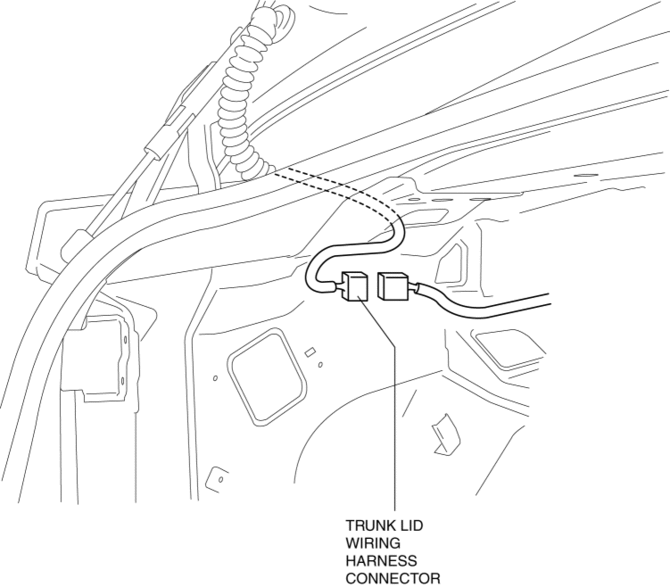
3. Disconnect the trunk lid wiring harness connector, then take the trunk lid wiring harness out from the vehicle.
4. Pry off the trunk lid stay damper band using a flathead screwdriver.
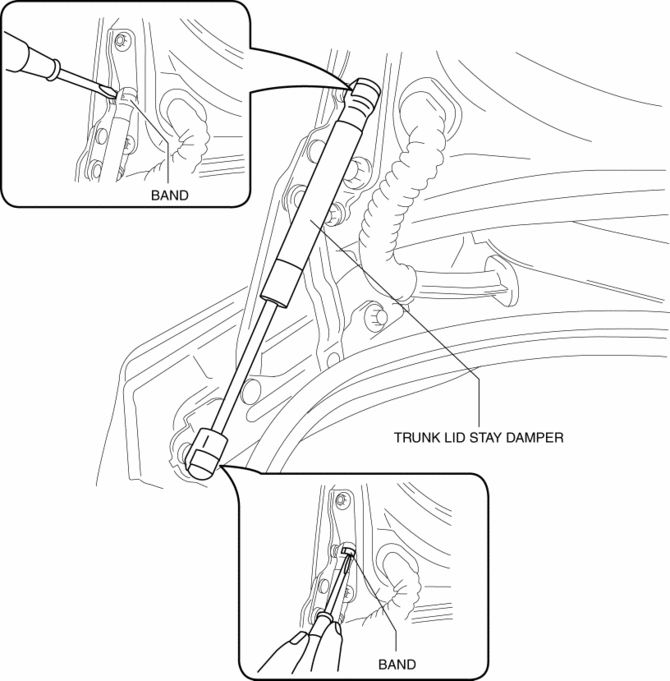
5. Pry out the connecting parts of the trunk lid stay damper out of the hinge with a flathead screwdriver, then remove the trunk lid stay damper.
6. Remove the nuts, then remove the trunk lid.
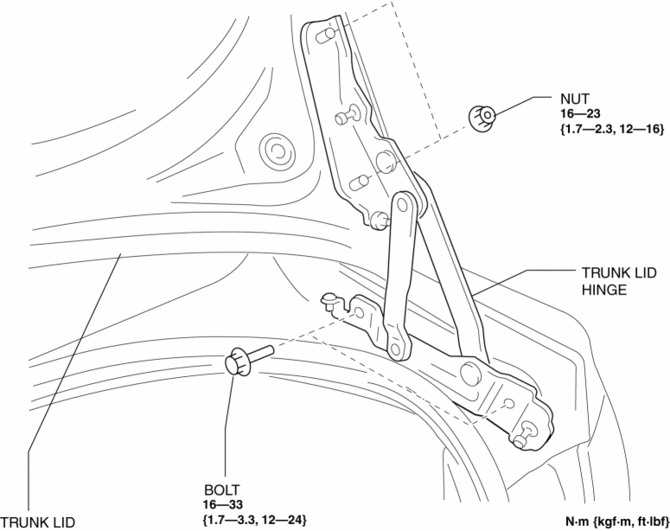
7. Remove the bolts, then remove the trunk lid hinge.
8. Install in the reverse order of removal.
9. Adjust the trunk lid..
 Trunk Lid Release Actuator Inspection
1. Disconnect the negative battery cable..
2. Remove the trunk lid trim..
3. Remove the trunk lid latch and release actuator..
4. Press the latch in using a flathead screwdriver to inspect the l ...
 Trunk Lid Stay Damper Disposal
NOTE:
The gas in the trunk lid stay damper is colorless, odorless, and non-toxic.
1. Wear protective eye wear.
2. Lay the trunk lid stay damper flat.
3. Hacksaw 2—3 mm {0.08— ...
Other materials:
Keyless Antenna Removal/Installation
Interior, Front
1. Disconnect the negative battery cable..
2. Remove the following parts:
a. Upper panel.
b. Shift knob (MTX).
c. Selector lever knob (ATX).
d. Shift panel.
e. Side wall.
f. Center panel.
g. Audio unit.
h. Rear heat duct (1).
3. Disconnect the connector.
4. ...
General Procedures (Steering)
Wheel and Tire Installation
1. When installing the wheels and tires, tighten the wheel nuts in a criss-cross
pattern to the following tightening torque.
Tightening torque
88—118 N·m {9.0—12 kgf·m, 65—87 ft·lbf}
Connector Disconnection
1. Disconnect the negative batte ...
Up Switch Inspection [FS5 A EL]
1. Perform the following procedures.
a. Remove the battery cover..
b. Disconnect the negative battery cable.
c. Remove the console..
d. Disconnect the selector lever component connector.
2. Inspect the continuity between the selector lever component terminals B and
H.
If ...
