
Mazda 3 Service Manual: Trunk Side Trim Removal/Installation
4SD
Left-side
1. Remove the following parts:
a. Rear scuff plate.
b. Tire house trim.
c. Trunk mat.
d. Trunk board.
e. Trunk end trim.
f. Service hole cover
2. Remove the fasteners.
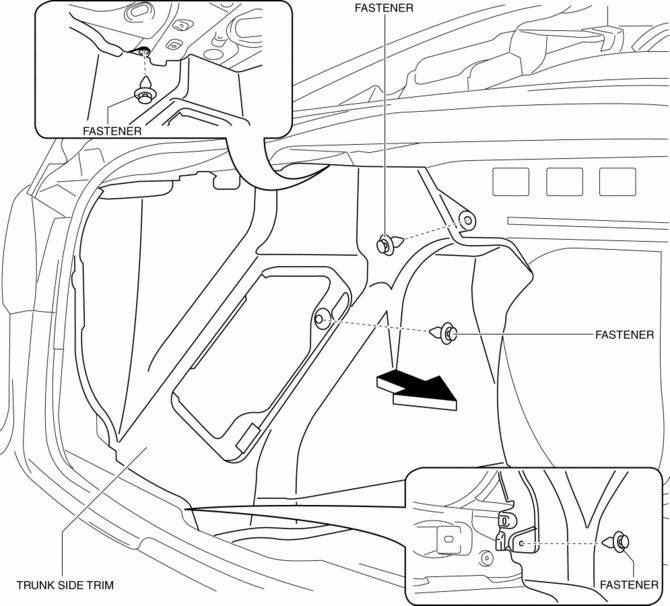
3. Install in the reverse order of removal.
Right-side
1. Remove the following parts:
a. Rear scuff plate.
b. Tire house trim.
c. Trunk mat.
d. Trunk board.
e. Trunk end trim.
2. Remove the fasteners and tab.
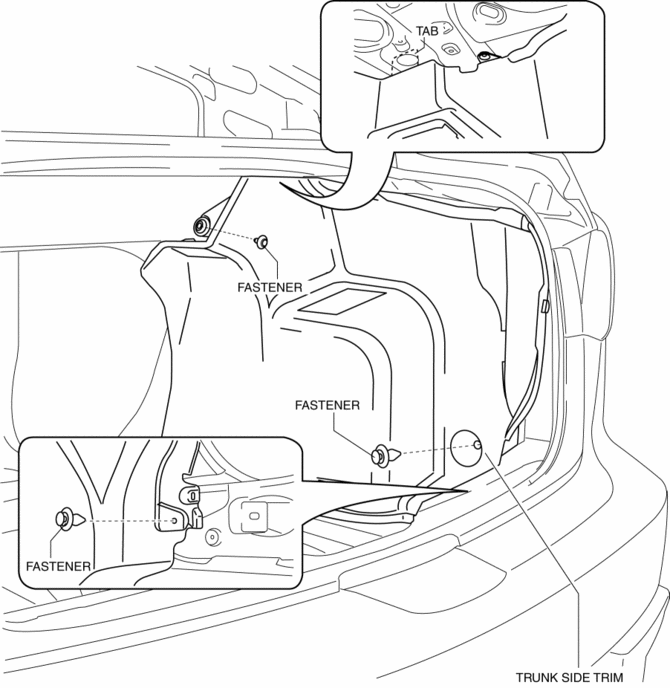
3. Install in the reverse order of removal.
5HB
1. Disconnect the negative battery cable..
2. Remove the following parts:
a. Rear seat.
b. Rear scuff plate.
c. Tire house trim.
d. Trunk end trim.
e. Trunk side upper trim.
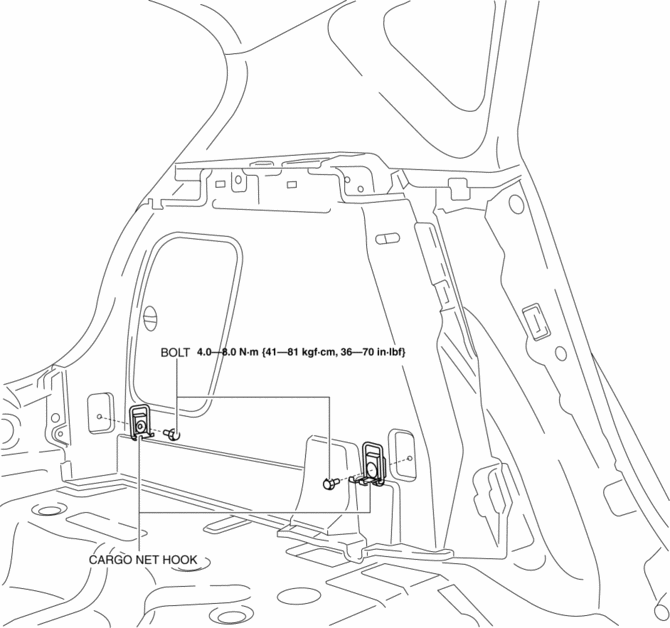
3. Remove the bolts, then remove the cargo net hooks.
4. Remove the fasteners.
5. Pull the trunk side trim in the direction of arrow, while remove the clip.
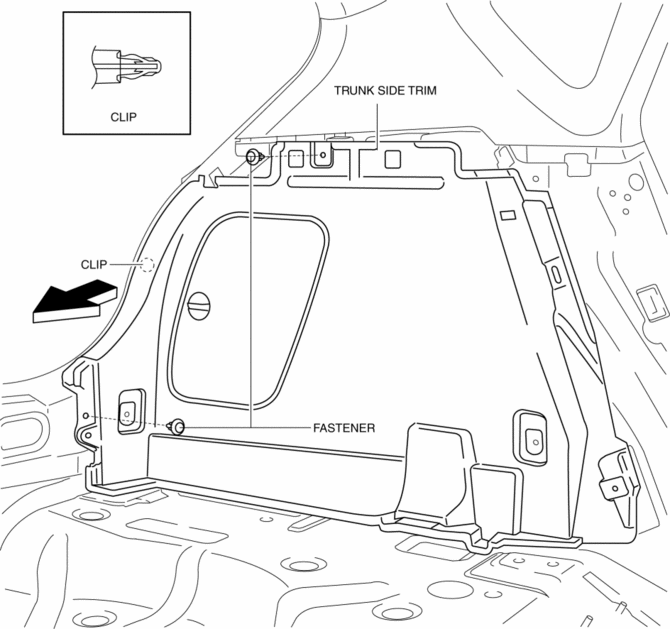
6. Remove the trunk side trim.
7. Disconnect the cargo compartment light connector. (Right-side only)
8. Install in the reverse order of removal.
 Trunk Lid Stay Damper Disposal
NOTE:
The gas in the trunk lid stay damper is colorless, odorless, and non-toxic.
1. Wear protective eye wear.
2. Lay the trunk lid stay damper flat.
3. Hacksaw 2—3 mm {0.08— ...
 Trunk Side Upper Trim Removal/Installation
1. Remove the rear seat cushion..
2. Remove the rear scuff plate..
3. Remove the tire house trim..
4. Open the cap.
5. Remove the screw.
6. Remove the fasteners.
7. Pull the trunk side upp ...
Other materials:
Cooling (With air conditioner)
Set the mode selector dial to the
position.
Set the temperature control dial to the
cold position.
Set the fan control dial to the desired
speed.
Turn on the air conditioner by pressing
the A/C switch.
After cooling begins, adjust the fan
control dial and temperature control
...
Glove Compartment Removal/Installation
CAUTION:
If the glove compartment is closed without being joined to the stay damper,
the stay damper may be damaged. Verify that the stay damper is joined to the
glove compartment before closing the glove compartment.
1. Pull the stay damper in the direction (1) shown in the figu ...
Check Valve Inspection [Skyactiv G 2.0]
Airflow Inspection
1. Remove the vacuum hose..
2. Blow air into the vacuum hose using your mouth from the vacuum pump side and
verify that the air flows to the intake manifold side, then blow air from the intake
manifold side and verify that the air does not flow to the vacuum pump side.
...
