
Mazda 3 Service Manual: Vacuum Hose Removal/Installation [Skyactiv G 2.0]
1. Remove the plug hole plate..
2. Remove the battery and battery tray..
3. Remove the vacuum hose from the vacuum hose clip.
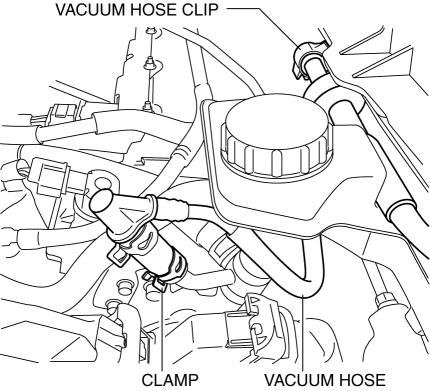
4. Pinch open the clamp using pliers and disconnect the vacuum hose from the vacuum pump.
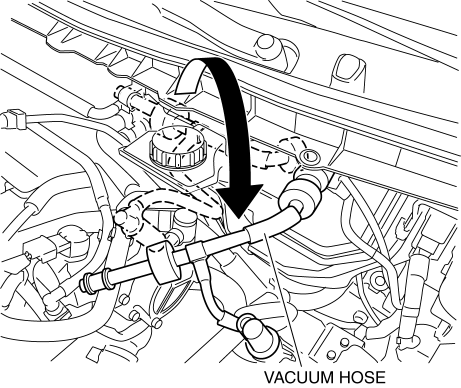
5. Move the vacuum hose as shown in the figure.
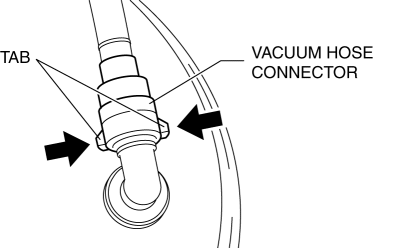
6. Disconnect the vacuum hose connector from the power brake unit while pressing the tabs of the vacuum hose connector.
7. Remove the vacuum hose.
8. Install in the reverse order of removal.
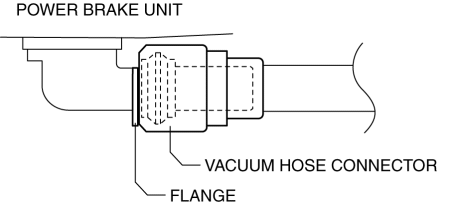
9. Insert the vacuum hose connector to the power brake unit.
10. Verify that the vacuum hose is inserted so that the connector contacts the power brake unit flange.
 Vacuum Hose Removal/Installation [Mzr 2.3 Disi Turbo]
1. Remove the charge air cooler cover..
2. Remove the charge air cooler..
3. Insert a thin flathead screwdriver at the point indicated by the arrow in
the figure, push the ring down and disconne ...
 Vacuum Line Inspection
MZR 2.0, MZR 2.5, MZR 2.3 DISI Turbo
1. Remove the vacuum hose..
2. Verify that air can be blown from the power brake unit side of the vacuum
hose towards the intake manifold side, and that air c ...
Other materials:
Rear Power Window Regulator Removal/Installation
1. Fully lower the rear door glass.
2. Disconnect the negative battery cable..
3. Remove the rear door trim..
4. Remove the service hole cover.
5. Remove the rear door speaker..
6. Remove the glass guide..
7. Remove the rear power window motor..
8. Remove the rear door glass..
9. ...
Tire rotation
To maintain balanced performance and ensure even wear across all wheels, rotate
the tires of your Subaru Solterra according to the recommended pattern illustrated
below.
Regular tire rotation on the Subaru Solterra helps extend overall tire lifespan,
improve handling stability, and maintain o ...
Glass Panel Adjustment
1. Fully close the glass panel.
2. Measure the gap and height between the glass panel and body.
If not as specified, loosen the glass panel installation screws and reposition
the glass panel.
Clearance (4SD)
a: -2.4—0.2 mm {-0.09—0.01 in}
b: 0 mm {0 in}
...
