
Mazda 3 Service Manual: Variable Tumble Shutter Valve Actuator Inspection [Mzr 2.0, Mzr 2.5]
Operation Inspection
1. Remove the air hose..
2. Disconnect the vacuum hose from the variable tumble shutter valve actuator.
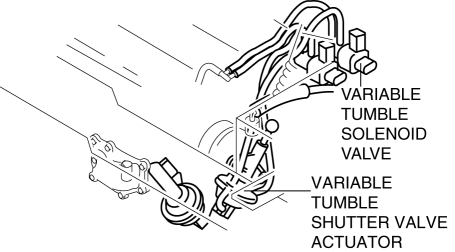
3. Connect a vacuum pump to the variable tumble shutter valve actuator.
NOTE:
-
Covered with a hood, the rod of the variable tumble shutter valve actuator cannot be seen from above. Use a mirror from under it to check the operation of the variable tumble shutter valve.
4. Check if the rod operates correctly as stated in the table when a gradual negative pressure is applied to the variable tumble shutter valve actuator.
|
Vacuum kPa {mmHg, inHg} |
Rod movement |
|
Below –2.7 {–20, –0.8} |
No operate |
|
Above –33.4 {–251, –9.86} |
Fully pulled |
-
When it is not possible to confirm it, replace the intake manifold..
-
When the variable tumble shutter valve actuator cannot be activated even though the operation of the rod can be confirmed, check for any incorrect connections or breakage of the vacuum hose.
 Variable Swirl Solenoid Valve Inspection [Mzr 2.3 Disi Turbo]
Airflow Inspection
1. Remove the battery cover..
2. Disconnect the negative battery cable..
3. Remove the variable swirl solenoid valve..
4. Inspect the airflow between the ports under the foll ...
 Variable Tumble Solenoid Valve Inspection [Mzr 2.0, Mzr 2.5]
Airflow Inspection
1. Remove the battery cover..
2. Disconnect the negative battery cable..
3. Remove the variable tumble solenoid valve..
4. Inspect airflow between the ports under the followi ...
Other materials:
Transaxle Range (TR) Switch Adjustment [FS5 A EL]
CAUTION:
Water or foreign objects entering the connector can cause a poor connection
or corrosion. Be sure not to drop water or foreign objects on the connector
when disconnecting it.
1. Engage the parking brake and use wheel chocks at the front and rear of the
wheels.
2. Shi ...
Electric Variable Valve Timing Actuator, Hydraulic Variable Valve Timing Actuator
Removal/Installation [Skyactiv G 2.0]
WARNING:
A hot engine can cause severe burns. Turn off the engine and wait until it
is cool before servicing.
CAUTION:
Do not disassemble the electric variable valve timing actuator and hydraulic
variable valve timing actuator because they are precision units.
If ...
Intermediate Sensor Removal/Installation [FS5 A EL]
CAUTION:
If foreign materials are stuck to the sensor, disturbance by magnetic flux
can cause sensor output to be abnormal and thereby negatively affect control.
Make sure that foreign materials such as iron filings are not stuck to the sensor
during installation.
1. Perform t ...
