
Mazda 3 Service Manual: Cargo Compartment Light Inspection
1. Disconnect the negative battery cable..
2. Remove the cargo compartment light..
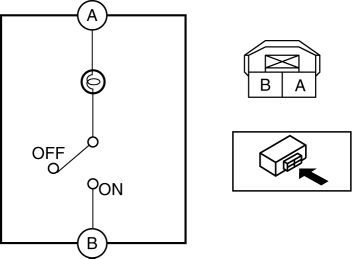
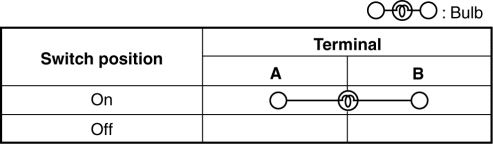
3. Verify that the continuity between the cargo compartment light terminals is as indicated in the table.
-
If not as indicated in the table, inspect the bulb. If there is no malfunction, replace the cargo compartment light.
 Cargo Compartment Light Bulb Removal/Installation
1. Disconnect the negative battery cable..
2. Remove the cargo compartment light..
3. Remove the cargo compartment light bulb.
4. Install in the reverse order of removal. ...
 Cargo Compartment Light Removal/Installation
1. Disconnect the negative battery cable..
2. Insert a tape-wrapped fastener remover into the service hole and pry with
the screwdriver in the direction shown by the arrow to remove the cargo comp ...
Other materials:
Remote Air Conditioning System
In the Subaru Solterra, the Remote Air Conditioning System utilizes
energy stored in the traction battery to allow the climate control system to be
activated remotely, providing a comfortable cabin environment before entering the
vehicle.
When the Subaru Solterra is connected to a charging ...
Trunk Lid Opener Lever Removal/Installation
1. Remove the front scuff plate (LH)..
2. Remove the front side trim (LH)..
3. Remove the fuel-filler lid opener bezel..
4. Partially peel back the floor covering.
5. Remove the bolts.
6. Disconnect the cable and trunk lid opener lever.
7. Install in the reverse order of removal. ...
List of storage features
Location of the storage features
Bottle holders
Card holders
Cup holders
Auxiliary box (if equipped)
Console box
Open tray
WARNING
■ Items that should not be left in the vehicle
Do not leave glasses, aerosol cans, or similar items inside the Subaru Solterra
storage co ...
