
Mazda 3 Service Manual: Cargo Compartment Light Bulb Removal/Installation
1. Disconnect the negative battery cable..
2. Remove the cargo compartment light..
3. Remove the cargo compartment light bulb.
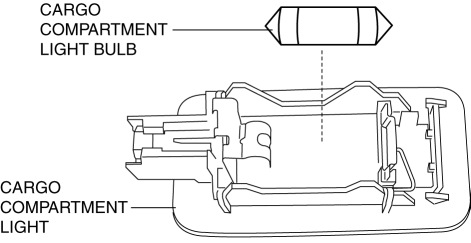
4. Install in the reverse order of removal.
 Auto Leveling Sensor Removal/Installation
1. Disconnect the negative battery cable..
2. Lift up the vehicle.
3. Disconnect the quick release connector. (charcoal canister side).
4. Remove in the order indicated in the table.
...
 Cargo Compartment Light Inspection
1. Disconnect the negative battery cable..
2. Remove the cargo compartment light..
3. Verify that the continuity between the cargo compartment light terminals is
as indicated in the table.
...
Other materials:
Side Air Bag Sensor No. 1 Removal/Installation [Two Step Deployment Control
System]
WARNING:
Handling the side air bag sensor improperly can accidentally operate (deploy)
the air bag module, which may seriously injure you. Read the air bag system
service warnings and cautions before handling the side air bag sensor..
1. Switch the ignition to off.
2. Disconnec ...
Light Switch Inspection
Vehicles Without Auto Light System
1. Disconnect the negative battery cable..
2. Remove the column cover..
3. Remove the light switch..
4. Verify that the continuity between the light switch terminals is as indicated
in the table.
If not as indicated in the table, replace the light ...
Wastegate Control Solenoid Valve Inspection [Mzr 2.3 Disi Turbo]
Airflow Inspection
1. Remove the battery cover..
2. Disconnect the negative battery cable..
3. Remove the wastegate control solenoid valve..
4. Inspect the airflow between the ports under the following conditions.
If not as specified, replace the wastegate control solenoid val ...
