
Mazda 3 Service Manual: Door Sash Film Installation
1. Remove any grease or dirt from the affixing surface of the door.
2. Cut away the unused portion along the dotted lines.
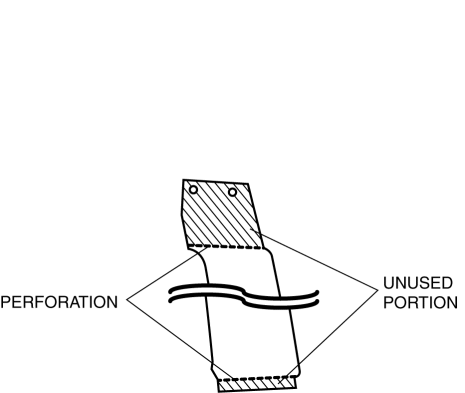
3. Peel off the backing paper and attach the door sash film onto the door as shown in the figure.
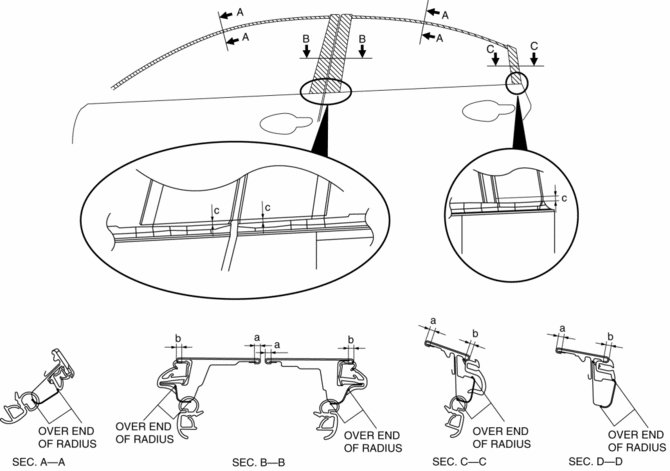
-
Standard clearance
-
a: 3.0—5.0 mm {0.12—0.19 in}
-
b: 3.0 mm or more {0.12 in or more}
-
c: 4.0—6.0 mm {0.16—0.23 in}
4. Peel off the transparent protective film on the door sash film.
5. Install the following parts:
a. Rear beltline molding.
b. Front beltline molding.
c. Rear door quarter glass.
d. Rear door speaker.
e. Rear door trim.
f. Power outer mirror.
g. Front door trim.
h. Inner garnish.
6. Connect the negative battery cable..
 Door Adjustment
1. Loosen the door hinge installation bolts.
2. Adjust the gap and height difference to the standard range by moving the door
back and forth, left and right.
Standard range
a: 2.5 ...
 Door Sash Film Removal
1. Disconnect the negative battery cable.
2. Partially peel back the glass run channel.
3. Partially peel back the door weatherstrip.
4. Remove the following parts:
a. Inner garnish.
b. Fron ...
Other materials:
Fuel Filler Cap Inspection [Mzr 2.0, Mzr 2.5]
Leakage Inspection
1. Perform the following SST (Evaporative Emission System Tester 134-01049A)
self-test:
NOTE:
If the tester does not work correctly during self-test, refer to the tester
operators manual for more detailed procedures.
a. Verify that the gas cylinder valve is c ...
Accessory Socket Removal/Installation
Front
1. Disconnect the negative battery cable..
2. Remove the upper panel..
3. Remove the shift lever knob. (MTX).
4. Remove the selector lever knob. (ATX).
5. Remove the shift panel.
6. Remove in the order indicated in the table.
1
Socket
(See Socket Rem ...
Customer Assistance
(Puerto Rico)
Your complete and permanent satisfaction is our business. That is why all
Authorized Mazda
Dealers have the knowledge and the tools to keep your Mazda vehicle in top
condition.
If you have any questions or recommendations for improvement regarding the
service of
your Mazda vehicle or serv ...
