
Mazda 3 Service Manual: Engine Coolant Leakage Inspection [Mzr 2.0, Mzr 2.5]
WARNING:
-
Never remove the cooling system cap or loosen the radiator drain plug while the engine is running, or when the engine and radiator are hot. Scalding engine coolant and steam may shoot out and cause serious injury. It may also damage the engine and cooling system.
-
Turn off the engine and wait until it is cool. Even then, be very careful when removing the cap. Wrap a thick cloth around it and slowly turn it counterclockwise 2.5 turns. Step back while the pressure escapes.
-
When you are sure all the pressure is gone, turn the cap using the cloth, and remove it.
1. Inspect the engine coolant level..
2. Remove the cooling system cap.
3. Install the SST
or aftermarket equivalent and a radiator cap tester to the coolant reserve tank filler port.
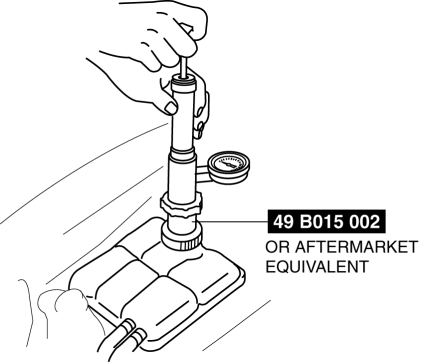
4. Apply pressure using the radiator cap tester.
CAUTION:
-
Applying more than 155 kPa {1.58 kgf/cm2, 22.5 psi} can damage the hoses, fittings, and other components, and cause leakage.
-
Engine coolant leakage inspection pressure
-
155 kPa {1.58 kgf/cm2, 22.5 psi} [1 min]
5. When pressurizing the cooling system, verify that the pressure is maintained.
-
If the gauge needle drops, it may indicate water leakage. Repair or replace the applicable part.
 Cooling System Service Warnings [Mzr 2.0, Mzr 2.5]
WARNING:
Never remove the cooling system cap or loosen the radiator drain plug while
the engine is running, or when the engine and radiator are hot. Scalding engine
coolant and steam may ...
 Engine Coolant Level Inspection [Mzr 2.0, Mzr 2.5]
WARNING:
Never remove the cooling system cap or loosen the radiator drain plug while
the engine is running, or when the engine and radiator are hot. Scalding engine
coolant and steam may ...
Other materials:
Camshaft Position (CMP) Sensor Inspection [Mzr 2.0, Mzr 2.5]
Visual Inspection
CAUTION:
When replacing the CMP sensor, make sure there is no foreign material on
it such as metal shavings. If it is installed with foreign material, the sensor
output signal will malfunction resulting from fluctuation in magnetic flux and
cause a deterioration i ...
Electronic sunshade
In the Subaru Solterra, the electronic sunshade is conveniently operated
using the overhead control switches, allowing you to regulate sunlight and cabin
brightness with ease and precision.
Operating the electronic sunshade
Open*
Close*
*: To stop the electronic sunshade at any i ...
Power Window System Preliminary Inspection [Power Window System]
Manual Open/close Function Inspection
STEP
INSPECTION
ACTION
1
Switch the ignition to ON.
Operate the power window using the manual open/close function on
the power window main switch.
...
