
Mazda 3 Service Manual: Ignition Key Illumination Removal/Installation
1. Disconnect the negative battery cable..
2. Remove the column cover upper..
3. Remove the ignition key illumination bulb.
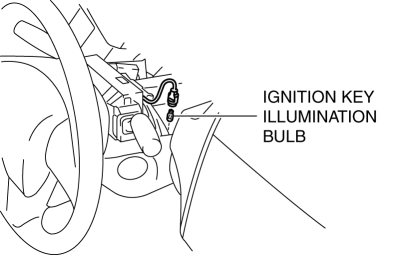
4. Install in the reverse order of removal.
 Cargo Compartment Light Removal/Installation
1. Disconnect the negative battery cable..
2. Insert a tape-wrapped fastener remover into the service hole and pry with
the screwdriver in the direction shown by the arrow to remove the cargo comp ...
 Inboard Light Removal/Installation
4SD
1. Disconnect the negative battery cable..
2. Remove the trunk lid trim..
3. Disconnect the connector.
4. Remove the nut.
5. Remove the bracket.
6. Remove the inboard light as shown ...
Other materials:
Head restraints
In the Subaru Solterra, head restraints are installed on every seat
and are engineered to provide crucial support for the head and neck, helping to
reduce the risk of injury during sudden braking or collisions.
WARNING
■ Head restraint precautions
Always follow these safety recommendations ...
Locking, Unlocking
Locking, Unlocking with
Transmitter
All doors and the liftgate can be locked/ unlocked by operating the keyless
entry system transmitter, refer to Keyless Entry System .
Locking, Unlocking with Door-
Lock Switch
All doors and the liftgate lock
automatically when the lock side is
pressed. Th ...
Rear Combination Light Removal/Installation
4SD
1. Disconnect the negative battery cable..
2. Remove the following parts:
a. Trunk mat.
b. Trunk board.
c. Trunk end trim.
d. Trunk side trim.
3. Disconnect the connectors shown in the figure and remove the nuts.
4. Pull the rear combination light in the direction of the arrow ...
