
Mazda 3 Service Manual: Interior Light Removal/Installation
1. Disconnect the negative battery cable..
2. Remove the rain sensor cover. (Vehicles with auto light/wiper system).
3. Remove the following parts:
a. Sunroof seaming welt (vehicles with sunroof)
b. A-pillar trim.
c. Front scuff plate.
d. Rear scuff plate.
e. B-pillar lower trim.
f. Upper anchor of the front seat belt.
g. B-pillar upper trim.
h. Rear seat cushion.
i. Tire house trim.
j. Trunk side upper trim (5HB).
k. C-pillar trim.
l. Map light.
m. Sunvisor.
n. Assist handle.
o. Headliner.
4. Pull in the direction of the arrows and detach the tabs.
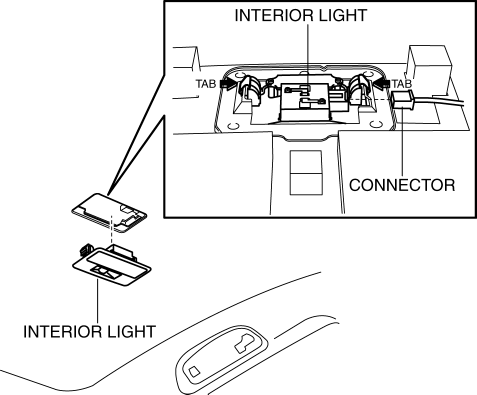
5. Disconnect the connector.
6. Remove the interior light.
7. Install in the reverse order of removal.
NOTE:
-
After installing the wiring harness, reinforce the urethane that was cut when removing the valve housing with vinyl tape.
 Interior Light Bulb Removal/Installation
1. Disconnect the negative battery cable..
2. Insert a tape-wrapped fastener remover into the service hole and pry with
the screwdriver in the direction shown by the arrow to remove the lens.
...
 Map Light Bulb Removal/Installation
1. Disconnect the negative battery cable..
2. Insert a tape-wrapped fastener remover into the service hole and pry with
the screwdriver in the direction shown by the arrow to remove the lens.
...
Other materials:
Operational Range
The system operates only when the driver
is in the vehicle or within operational
range while the key is being carried.
Starting the Engine
NOTE
Starting the engine may be possible
even if the key is outside of the vehicle
and extremely close to a door and
window, however, always start ...
Lane Departure Warning System (LDWS)
The LDWS notifies the driver that the vehicle may be deviating from its
lane.
The system detects the white or yellow lines on the traffic lane using the
Forward Sensing
Camera (FSC). If it determines that the vehicle may be deviating from its lane,
it notifies
the driver by flashing the L ...
Heating
Set the mode selector dial to the
position.
Set the air intake selector to the outside
air position.
Set the temperature control dial to the
hot position.
Set the fan control dial to the desired
speed.
If dehumidified heating is desired, turn
on the air conditioner.
NOTE
...
