
Mazda 3 Service Manual: Map Light Bulb Removal/Installation
1. Disconnect the negative battery cable..
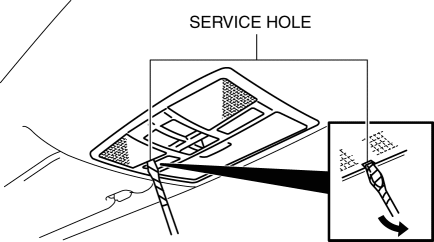
2. Insert a tape-wrapped fastener remover into the service hole and pry with the screwdriver in the direction shown by the arrow to remove the lens.
3. Remove the map light bulb.
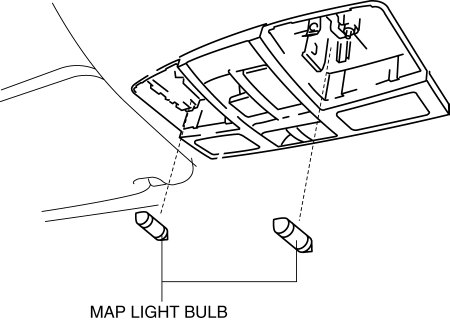
4. Install in the reverse order of removal.
 Interior Light Removal/Installation
1. Disconnect the negative battery cable..
2. Remove the rain sensor cover. (Vehicles with auto light/wiper system).
3. Remove the following parts:
a. Sunroof seaming welt (vehicles with sunroof ...
 Map Light Inspection
1. Disconnect the negative battery cable..
2. Remove the map light..
3. Verify that the continuity between the map light terminals is as indicated
in the table.
If not as indicated i ...
Other materials:
Push-Starting
Do not push-start your Mazda.
WARNING
Never tow a vehicle to start it:
Towing a vehicle to start it is
dangerous. The vehicle being towed
could surge forward when its engine
starts, causing the two vehicles to
collide. The occupants could be injured.
CAUTION
...
Front Shock Absorber And Coil Spring Removal/Installation
CAUTION:
Performing the following procedures without first removing the ABS wheel-speed
sensor may possibly cause an open circuit in the wiring harness if it is pulled
by mistake. Before performing the following procedures, disconnect the ABS wheel-speed
sensor wiring harness connec ...
Neutral Switch Removal/Installation [G66 M R]
1. Remove the battery cover..
2. Disconnect the negative battery cable.
3. Remove the battery component. (ex: battery, battery tray and PCM component).
4. Remove the aerodynamic under cover No.2..
5. Drain the oil from the transaxle..
6. Remove the neutral switch.
7. Install the neu ...
