
Mazda 3 Service Manual: Neutral Switch Removal/Installation [A26 M R]
1. Disconnect the negative battery cable.
2. Disconnect the neutral switch connector.
3. Remove the aerodynamic under cover No.2..
4. Remove the neutral switch with the gasket.
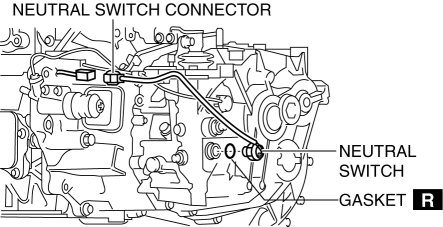
5. Install a new gasket and the neutral switch to the transaxle case.
-
Tightening torque
-
29—39 N·m {3.0—3.9 kgf·m, 22—28 ft·lbf}
6. Install the aerodynamic under cover No.2..
7. Connect the neutral switch connector.
8. Connect the negative battery cable.
 M Position Switch Inspection [Fw6 A EL]
Continuity Inspection
NOTE:
The M position switch is built into the selector lever component.
1. Remove the battery cover..
2. Disconnect the negative battery cable..
3. Remove the ...
 Neutral Switch Removal/Installation [C66 M R]
1. Remove the battery cover..
2. Disconnect the negative battery cable..
3. Remove the aerodynamic under cover No.2..
4. Install in the reverse order of removal.
5. Remove in the order indicat ...
Other materials:
Clutch Pedal Inspection [C66 M R]
NOTE:
For the clutch pedal inspection, note the followings and measure each inspection
location.
Measure the center of the upper surface of the pedal pad for each inspection.
If the distance from the pedal pad to the floor covering is measured,
measure the shor ...
Vehicle Speed Sensor (VSS) Inspection [FS5 A EL]
On-Vehicle Inspection
1. Inspect the power supply circuit for the VSS.
a. Remove the insulator from the transaxle.
b. Disconnect the VSS connector.
c. Switch the ignition to ON (engine off).
d. Measure the voltage at VSS connector terminal A (harness-side).
If there is a ...
Canister Vent (Cv) Solenoid Valve Removal/Installation [Mzr 2.0, Mzr 2.5]
Except for Mexico
1. Remove the battery cover..
2. Disconnect the negative battery cable..
3. Remove in the order indicated in the table.
1
CV solenoid valve connector
2
Evaporative hose No.1
3
Evaporative hos ...
