
Mazda 3 Service Manual: Oil Seal (Differential) Replacement [A26 M R]
1. On level ground, jack up the vehicle and support it evenly on safety stands.
2. Drain the oil from the transaxle..
3. Remove the front tires..
4. Remove the splash shield..
5. Remove the aerodynamic under cover No.2..
6. Separate the drive shaft and joint shaft from the transaxle..
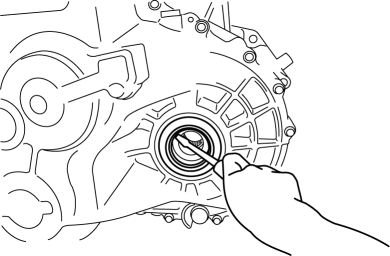
7. Remove the oil seals using a screwdriver.
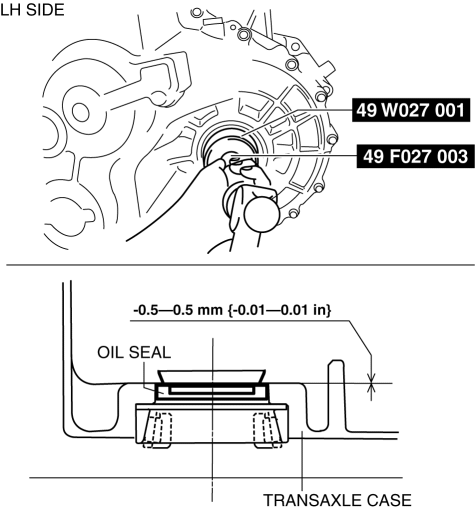
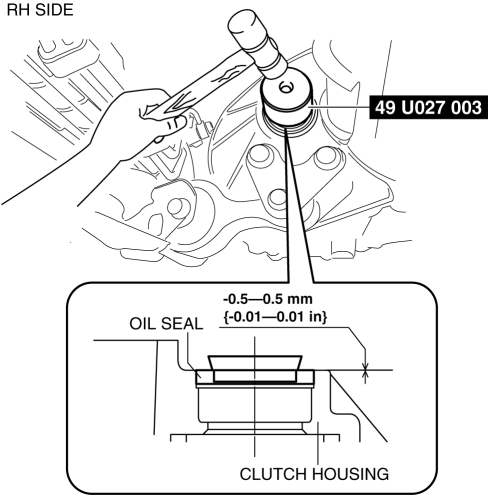
8. Using the SSTs
and a hammer, tap each new oil seal in evenly until the SSTs
contact the transaxle case.
9. Coat the lip of each oil seal with transaxle oil.
10. Insert the drive shaft and joint shaft to the transaxle..
11. Install the aerodynamic under cover No.2..
12. Install the splash shield..
13. Install the front tires..
14. Add the specified amount and type of oil..
 Differentials
...
 Oil Seal (Differential) Replacement [C66 M R]
1. Remove the aerodynamic under cover No.2 and the splash shield as a single
unit..
2. Drain the manual transaxle oil..
3. Disconnect the drive shaft (LH) from the MTX..
4. Disconnect the driv ...
Other materials:
Maintenance Monitor (Type B audio)
Select the icon on the
home screen to display the “Applications” screen.
Select “Maintenance” to display the maintenance list screen.
Switch the tab and select the setting item you want to change.
You can customize settings in the setup display as follows:
...
How to Use Stitcher™* Radio
What is Stitcher™ Radio?
Stitcher™ radio is an application which can be used to listen to Internet radio
or stream
podcasts.
Recommended content is automatically selected by registering content which you
put into
your favorites, or by pressing the Like or Dislike button.
For details ...
Joint Shaft Removal/Installation [Skyactiv G 2.0]
CAUTION:
Performing the following procedures without first removing the ABS wheel-speed
sensor may possibly cause an open circuit in the wiring harness if it is pulled
by mistake. Before performing the following procedures, remove the ABS wheel-speed
sensor connector (axle side) and ...
