
Mazda 3 Service Manual: Oil Seal (Differential) Replacement [C66 M R]
1. Remove the aerodynamic under cover No.2 and the splash shield as a single unit..
2. Drain the manual transaxle oil..
3. Disconnect the drive shaft (LH) from the MTX..
4. Disconnect the drive shaft (RH) from the joint shaft..
5. Remove the joint shaft..
6. Remove the oil seal (LH).
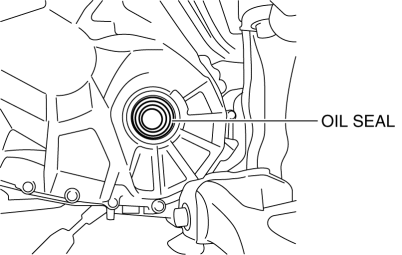
7. Remove the oil seal (RH).
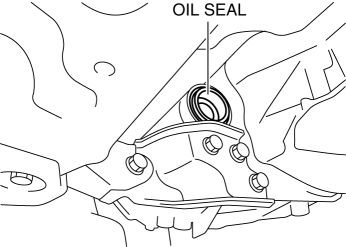
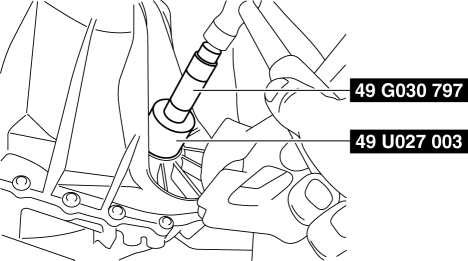
8. Using the SST
s and a hammer, tap each a new oil seal (LH) in evenly until the SST
s contacts the transaxle case.
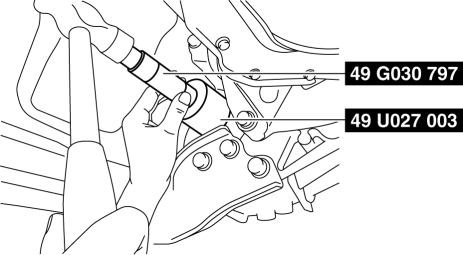
9. Using the SST
s and a hammer, tap each a new oil seal (RH) in evenly until the SST
s contacts the transaxle case.
10. Coat the lip of each oil seal with transaxle oil.
11. Install in the reverse order of removal.
12. Add the specified amount of specified transaxle oil..
 Oil Seal (Differential) Replacement [A26 M R]
1. On level ground, jack up the vehicle and support it evenly on safety stands.
2. Drain the oil from the transaxle..
3. Remove the front tires..
4. Remove the splash shield..
5. Remove the a ...
 Oil Seal (Differential) Replacement [Fw6 A EL]
1. Remove the aerodynamic under cover No.2 and the splash shield as a single
unit..
2. Remove the oil seal.
a. Drain the ATF..
b. Disconnect the drive shaft (LH) from the transaxle..
c. Disc ...
Other materials:
Dashboard Disassembly/Assembly
1. Remove the ventilator grilles..
2. Remove the Passenger-side air bag module..
3. Disassemble in the order indicated in the table.
4. Assemble in the reverse order of disassembly.
1
Wiring harness
2
Screw
3
...
Malfunctioning Wheel Unit Identification
NOTE:
The tire pressure monitoring system (TPMS) does not identify the location
of the malfunctioning wheel unit on the vehicle (RF, LF, LR, RR). The TPMS identifies
each wheel unit as No.1, No.2, No.3 and No.4. In order to identify the location
of the wheel unit, perform the follow ...
Antenna Feeder No.1 Inspection
1. Disconnect the negative battery cable..
2. Remove the following parts:
a. Center panel.
b. Audio unit.
c. A-pillar trim (RH).
3. Disconnect antenna feeder No.2.
4. Verify that the continuity between antenna feeder No.1 terminals is as indicated
in the table.
If not a ...
