
Mazda 3 Service Manual: Passenger Side Air Bag Module Removal/Installation [Standard Deployment Control System]
WARNING:
-
Handling the air bag module improperly can accidentally deploy the air bag module, which may seriously injure you. Read the air bag system service warnings and cautions before handling the air bag module..
NOTE:
-
When replacing the passenger-side air bag module after the deployment, replace it together with the mid-wiring harness.
-
When installing the mid-wiring harness, install it along the vehicle wiring harness using bands or tape.
1. Switch the ignition to off.
2. Disconnect the negative battery cable and wait for 1 min or more
..
3. Remove the following parts:
a. Passenger-side front scuff plate.
b. Passenger-side front side trim.
c. Dashboard under cover.
d. Glove compartment.
e. Passenger-side lower panel.
f. SIRIUS satellite radio unit (with SIRIUS satellite radio system).
4. Disconnect the connector.
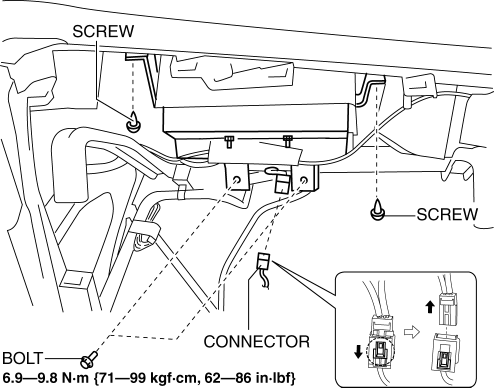
5. Remove the screws.
6. Remove the bolts.
7. Pull the passenger-side air bag module in the direction of arrow (1) and detach the hook A from the instrument panel.
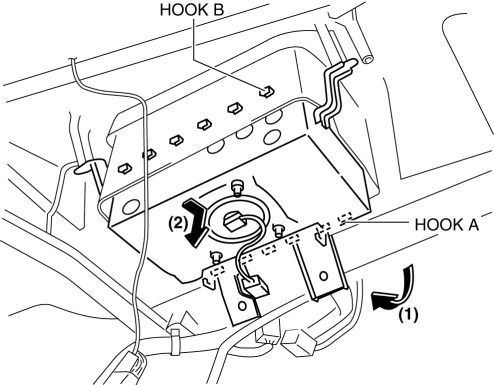
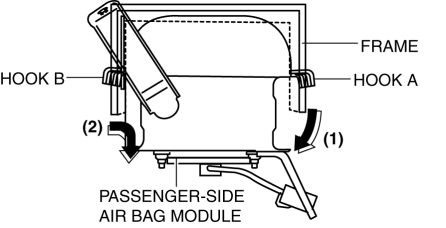
8. Pull the passenger-side air bag module in the direction of arrow (2) and detach the hook B from the instrument panel and remove it.
9. Install in the reverse order of removal.
10. Switch the ignition to ON.
11. Verify that the air bag system warning light illuminates for approx. 6 s
and goes out.
-
If the air bag system warning light does not operate, refer to the on-board diagnostic system (air bag system) and perform inspection of the system..
 PID/Data Monitor Inspection [Two Step Deployment Control System]
1. Connect the M-MDS (IDS) to the DLC-2.
2. After the vehicle is identified, select the following items from the initialization
screen of the IDS.
a. Select “DataLogger”.
b. Select “ ...
 Passenger Side Air Bag Module Removal/Installation [Two Step Deployment Control
System]
Passenger Side Air Bag Module Removal/Installation [Two Step Deployment Control
System]
WARNING:
Handling the air bag module improperly can accidentally deploy the air bag
module, which may seriously injure you. Read the air bag system service warnings
and cautions before h ...
Other materials:
Tires
For reasons of proper performance, safety,
and better fuel economy, always maintain
recommended tire inflation pressures and
stay within the recommended load limits
and weight distribution.
WARNING
Using Diff erent Tire Types:
Driving your vehicle with diff erent
types of tires ...
Engine Oil Level Inspection [Mzr 2.0, Mzr 2.5]
1. Position the vehicle on level ground.
2. Warm up the engine.
3. Stop the engine and allow at least 5 min before continuing.
4. Remove the dipstick, wipe it cleanly, and reinstall it fully.
5. Remove the dipstick and verify that the oil level is between the F and L marks
on the dipstick. ...
Oil Seal (Differential) Replacement [C66 M R]
1. Remove the aerodynamic under cover No.2 and the splash shield as a single
unit..
2. Drain the manual transaxle oil..
3. Disconnect the drive shaft (LH) from the MTX..
4. Disconnect the drive shaft (RH) from the joint shaft..
5. Remove the joint shaft..
6. Remove the oil seal (LH).
...
