
Mazda 3 Service Manual: Seat Warmer Unit Inspection
WARNING:
-
Handling a front seat (with built-in side air bag) improperly can accidentally operate (deploy) the air bag, which may seriously injure you. Read the service warnings before handling a front seat (with built-in side air bag)..
CAUTION:
-
After removing a front seat, do not operate the slider lever. If the slider lever is operated, the left and right slide positions will deviate, and the slide adjuster may be damaged after the front seat is installed.
-
Verify that there are no malfunctions in the sliding mechanism after installing a front seat.
-
When performing the procedure with a front seat removed from the vehicle, perform the procedure on a clean rag so as not to damage or soil the seat.
-
When the passenger's seat is removed, perform the seat weight sensor inspection using the M-MDS after installing the passenger's seat..
-
When the passenger's seat is replaced with a new one, perform the seat weight sensor calibration using the M-MDS..
Seat Cushion
1. Remove the battery cover..
2. Disconnect the negative battery cable and wait 1 min or more
..
3. Remove the front seat..
4. Remove the front seat side cover.
5. Remove the front seat cushion trim..
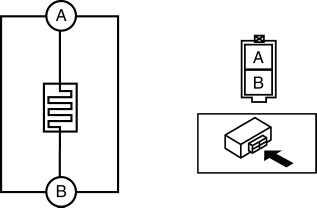
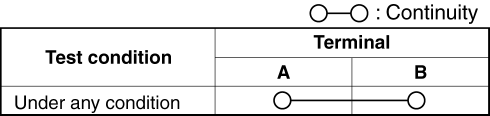
6. Verify that the continuity between terminals A and B is as indicated in the table.
-
If not as indicated in the table, replace the seat warmer unit..
Seat Back
1. Remove the battery cover..
2. Disconnect the negative battery cable and wait 1 min or more
..
3. Remove the front seat..
4. Remove the front seat back trim..
5. Verify that the continuity between terminals A and B is as indicated in the table.
-
If not as indicated in the table, replace the seat warmer unit..
 Seat Warmer Switch Removal/Installation
1. Remove the battery cover..
2. Disconnect the negative battery cable..
3. Remove the shift panel..
4. Squeeze the tabs of seat warmer switch and pull it outward to remove it.
5. Remove ...
 Seat Warmer Unit Removal/Installation
Removal
WARNING:
Handling a front seat (with built-in side air bag) improperly can accidentally
operate (deploy) the air bag, which may seriously injure you. Read the service
warnings b ...
Other materials:
Glossary of Terms
Tire Placard: A label indicating the OE tire sizes, recommended inflation
pressure, and the
maximum weight the vehicle can carry.
Tire Identification Number (TIN): A number on the sidewall of each tire
providing
information about the tire brand and manufacturing plant, tire size, and date o ...
Front Bumper Reinforcement Removal/Installation
1. Disconnect the negative battery cable..
2. Remove the following parts:
a. Front bumper.
b. Seal plate.
3. Remove the bolts A.
4. Remove the bolts B.
5. Remove the front bumper reinforcement.
6. Install in the reverse order of removal. ...
Theft Deterrent System Reading Freeze Frame Data
1. Connect the M-MDS (IDS) to the DLC–2.
2. After the vehicle is identified, select the following items from the initialization
screen of the IDS.
Select “Body”.
Select "Burglar Service Functions".
3. Then, select the following item from the screen menu. ...
