
Mazda 3 Service Manual: Seat Weight Sensor Calibration [Two Step Deployment Control System]
CAUTION:
-
If any of the following work is performed, perform the seat weight sensor calibration using the M-MDS.
-
Replacement with a new seat weight sensor
-
Replacement with a new seat weight sensor control module
-
Replacement with new passenger-side seat parts
-
Disassembly of the passenger-side seat
-
If any of the following work is performed, perform the seat weight sensor inspection using the M-MDS..
-
Removal of the passenger-side seat
-
Loosening and retightening of passenger’s seat fixing bolts
-
Or, the vehicle is involved in a collision
NOTE:
-
When seat weight sensor calibration is performed causing the SAS control module to detect the DTC, perform the following procedure.
1. Have two 20 kg {44 lb}
weights ready to use.
2. Connect the M-MDS (IDS) to the DLC-2.
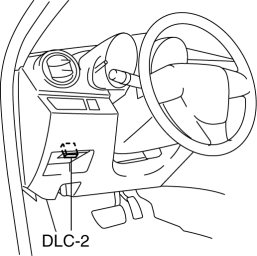
3. After the vehicle is identified, select the following items from the initialization screen of the IDS.
a. Select “Body”.
b. Select “Restraints”.
c. Select “Passenger Seat Weight Sensor ReZero”.
4. Then, select item from the SWS Calibration screen menu in the following order.
-
Select “(1)-When you have replaced any SWS or SWS module, and/or any seat part except SWS.”
5. Perform calibration following the procedures on the M-MDS screen.
 Seat Track Position Sensor Removal/Installation [Two Step Deployment Control
System]
Seat Track Position Sensor Removal/Installation [Two Step Deployment Control
System]
1. Switch the ignition to off.
2. Disconnect the negative battery cable and wait for 1min or more..
3. Remove the front driver’s seat..
4. Remove the front seat slide adjuster..
5. Remove t ...
 Seat Weight Sensor Control Module Removal/Installation [Two Step Deployment
Control System]
Seat Weight Sensor Control Module Removal/Installation [Two Step Deployment
Control System]
CAUTION:
When the seat weight sensor control module is replaced with a new one, perform
the seat weight sensor calibration using the M–MDS..
1. Switch the ignition to off.
2. Disc ...
Other materials:
Outside Mirrors
WARNING
Be sure to look over your shoulder
before changing lanes:
Changing lanes without taking
into account the actual distance of
the vehicle in the convex mirror is
dangerous. You could have a serious
accident. What you see in the convex
mirror is closer than it app ...
Head Restraints
Your vehicle is equipped with head
restraints on all outboard seats and the
rear center seat * . The head restraints
are intended to help protect you and the
passengers from neck injury.
WARNING
Always drive with the head restraints
installed when seats are being used and
make s ...
Master Cylinder Removal/Installation [Mzr 2.0, Skyactiv G 2.0, Mzr 2.5]
1. Remove the battery and battery tray..
2. Remove in the order indicated in the table.
3. Install in the reverse order of removal.
1
Brake fluid level sensor connector
2
Reserve hose (MTX)
(See Reserve Hose (MTX) Removal Note.)
(Se ...
