
Mazda 3 Service Manual: Vacuum Hose Removal/Installation [Mzr 2.0, Mzr 2.5]
1. Remove the battery and battery tray..
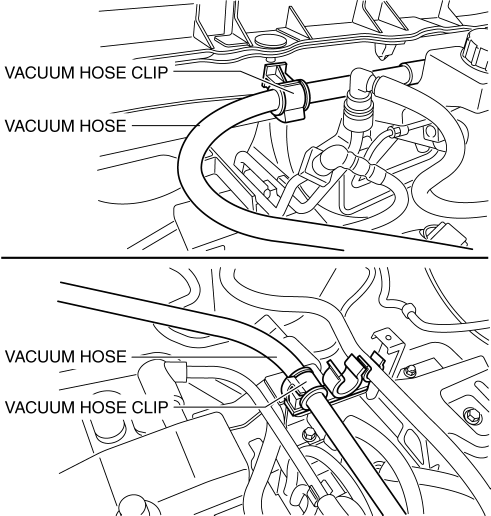
2. Remove the vacuum hose from the vacuum hose clip.
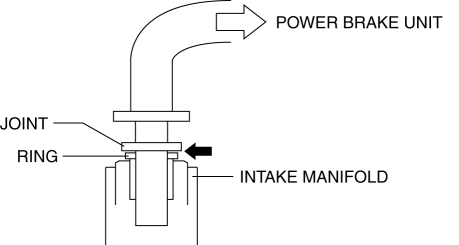
3. Insert a thin flathead screwdriver at the point indicated by the arrow in the figure, push the ring down and disconnect the vacuum hose from the intake manifold.
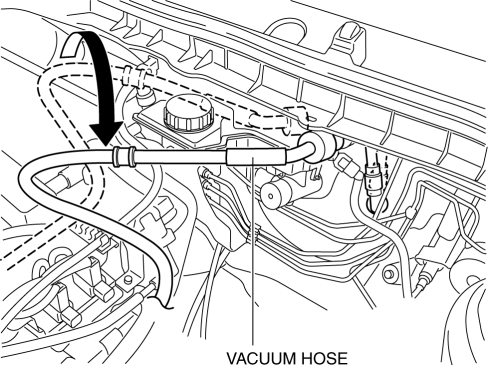
4. Move the vacuum hose as shown in the figure.
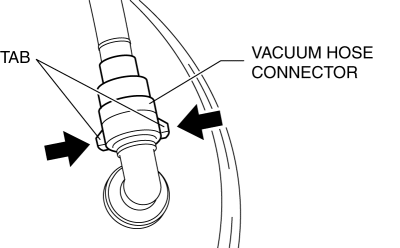
5. Disconnect the vacuum hose connector from the power brake unit while pressing the tabs of the vacuum hose connector.
6. Remove the vacuum hose.
7. Install in the reverse order of removal.
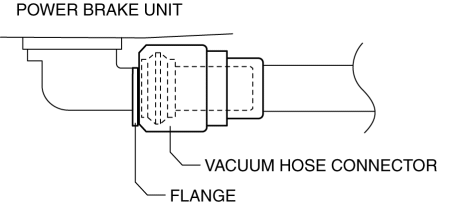
8. Insert the vacuum hose connector to the power brake unit.
9. Verify that the vacuum hose is inserted so that the connector contacts the power brake unit flange.
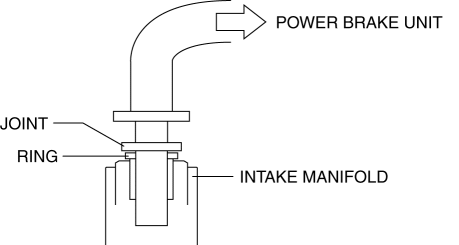
10. Verify that the vacuum hose is inserted so that the joint contacts the intake manifold ring.
 Power Brake Unit Removal/Installation [Mzr 2.3 Disi Turbo]
CAUTION:
Once the brake switch clearance has automatically been adjusted, it cannot
be adjusted again. Therefore, replace the switch with a new one when replacing
the power brake unit or ...
 Vacuum Hose Removal/Installation [Mzr 2.3 Disi Turbo]
1. Remove the charge air cooler cover..
2. Remove the charge air cooler..
3. Insert a thin flathead screwdriver at the point indicated by the arrow in
the figure, push the ring down and disconne ...
Other materials:
Jacking Positions, Vehicle Lift (2 Supports) And Safety Stand (Rigid Rack) Positions
Jacking Positions
WARNING:
Improperly jacking a vehicle is dangerous. The vehicle can slip off the jack
and cause serious injury. Use only the correct front and rear jacking points
and block the wheels.
Use safety stands to support the vehicle after it has been lifted.
...
Checking Tire Pressure
When you check the air pressure, make sure the tires are cold —meaning
they are not hot
from driving even a mile.
Remove the cap from the valve on one tire.
Firmly press a tire gauge onto the valve.
Add air to achieve recommended air pressure.
If you overfill the tire, release air ...
Power/Volume/Sound Controls
Power ON/OFF
Switch the ignition to ACC or ON. Press
the power/volume dial to turn the audio
system on. Press the power/volume dial
again to turn the audio system off.
Volume adjustment
To adjust the volume, turn the power/
volume dial. Turn the power/volume
dial clockwise to increase vo ...
