
Mazda 3 Service Manual: Back Up Light Switch Inspection
1. Disconnect the negative battery cable..
2. Remove the battery component. (ex: battery, battery tray and PCM component) (G35-MR,G66M-R).
3. Remove the aerodynamic under cover No.2. (G35-MR,G66M-R,C66M-R).
4. Disconnect the back-up light switch connector..
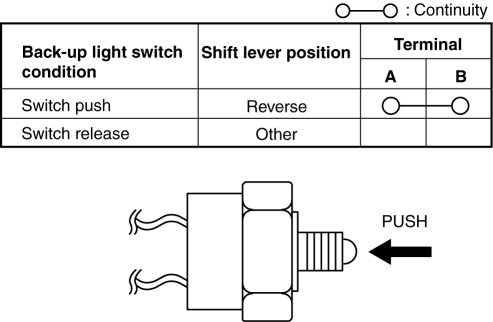
5. Verify that the continuity between the back-up light switch terminals is as indicated in the table.
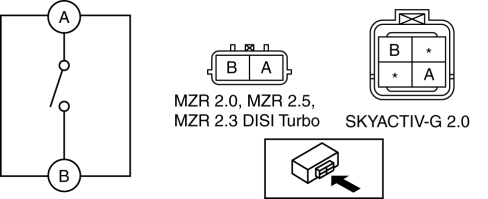
-
If not as indicated in the table, replace the back-up light switch.
 Rear Combination Light Removal/Installation
4SD
1. Disconnect the negative battery cable..
2. Remove the following parts:
a. Trunk mat.
b. Trunk board.
c. Trunk end trim.
d. Trunk side trim.
3. Disconnect the connectors shown in th ...
 Back Up Light Switch Removal/Installation [A26 M R]
1. Disconnect the negative battery cable.
2. Disconnect the back-up light switch connector.
3. Remove the aerodynamic under cover No.2..
4. Remove the back-up light switch with the gasket.
...
Other materials:
Customer Assistance
(Puerto Rico)
Your complete and permanent satisfaction is our business. That is why all
Authorized Mazda
Dealers have the knowledge and the tools to keep your Mazda vehicle in top
condition.
If you have any questions or recommendations for improvement regarding the
service of
your Mazda vehicle or serv ...
Afs (Adaptive Front Lighting System) Off Switch Inspection
1. Disconnect the negative battery cable..
2. Remove the AFS OFF switch..
3. Verify that the continuity between the AFS OFF switch terminals is as indicated
in the table.
If the continuity is not as indicated in the table, replace the AFS OFF switch.
4. Apply battery po ...
Power Brake Unit Removal/Installation [Mzr 2.3 Disi Turbo]
CAUTION:
Once the brake switch clearance has automatically been adjusted, it cannot
be adjusted again. Therefore, replace the switch with a new one when replacing
the power brake unit or performing any procedure that changes the pedal stroke.
Secure the steering wheel using tap ...
