
Mazda 3 Service Manual: Blind Spot Monitoring (Bsm) Bracket Removal/Installation
1. Disconnect the negative battery cable..
2. Remove the rear combination light..
3. Remove the rear bumper..
4. Remove the BSM control module..
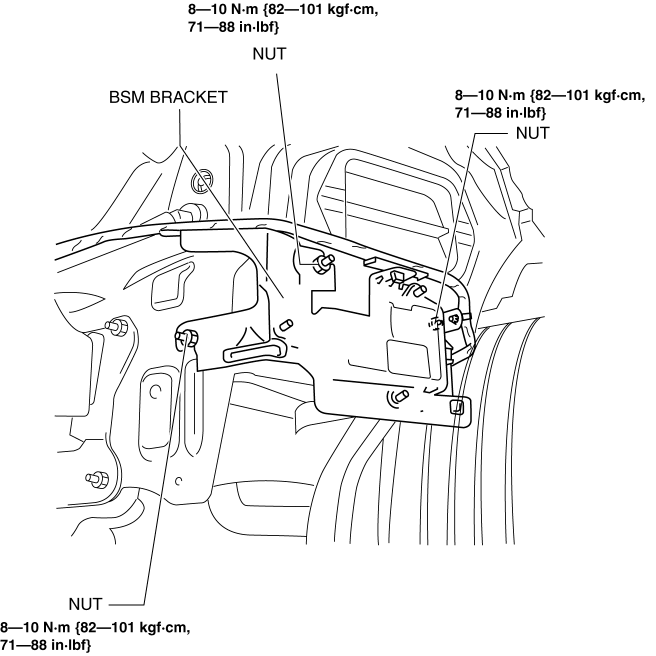
5. Remove the nuts.
6. Remove the clip.
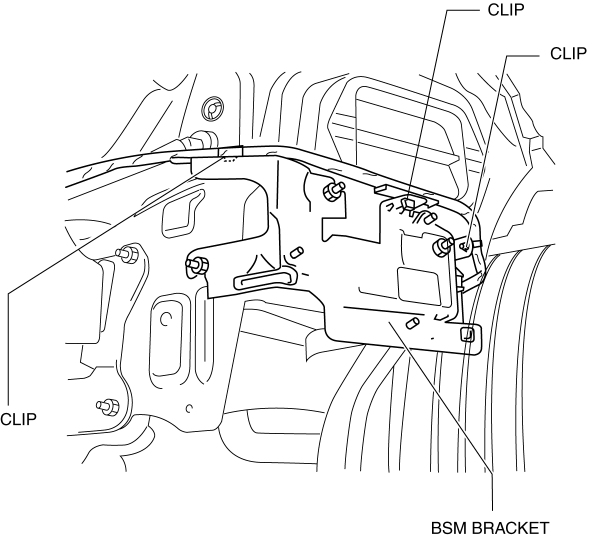
7. Remove the BSM bracket.
8. Install in the reverse order of removal.
9. Perform the blind spot monitoring radar test..
 Active Command Modes Inspection [Blind Spot Monitoring (Bsm)]
1. Connect the M-MDS (IDS) to the DLC-2.
2. After the vehicle is identified, select the following items from the initialization
screen of the IDS.
a. Select “DataLogger”.
b. Select “ ...
 Blind Spot Monitoring (Bsm) Control Module Inspection
1. Disconnect the negative battery cable.
2. Remove the rear combination light..
3. Remove the rear bumper..
4. Connect the negative battery cable..
5. Measure the voltage at each terminal is ...
Other materials:
Drive mode select switch
The drive modes of the Subaru Solterra can be adjusted to match different
driving conditions, ensuring optimal performance, efficiency, and comfort.
Selecting a drive mode
By pressing the drive mode select switch, the Subaru Solterra cycles through
three distinct driving modes: Power mode, Nor ...
Audio Unit Removal/Installation
Without Display
CAUTION:
When installing the audio unit, make sure that the wiring harness and antenna
feeder are not caught between the unit and dashboard. If the wiring harness
or the antenna feeder is caught between the unit and dashboard, it may cause
malfunctions.
Pres ...
Child Restraint Seat Anchor Removal/Installation
4SD
1. Remove the cover.
2. Remove the bolt and child-restraint seat anchor.
3. Install in the reverse order of removal.
5HB
1. Remove the trunk end trim..
2. Remove the bolt and child-restraint seat anchor.
3. Install in the reverse order of removal. ...
