
Mazda 3 Service Manual: Clock Spring Adjustment
NOTE:
-
The adjustment procedure is also specified on the caution label of the clock spring.
1. Set the front wheels straight ahead.
CAUTION:
-
The clock spring will break if over–wound. Do not forcibly turn the clock spring.
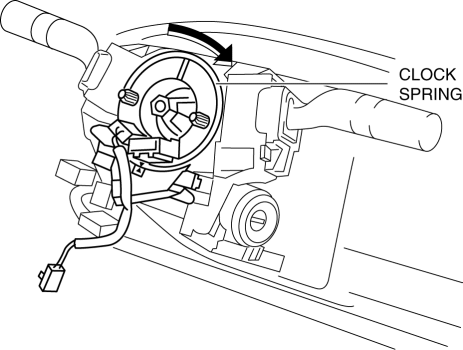
2. Turn the clock spring clockwise until it stops.
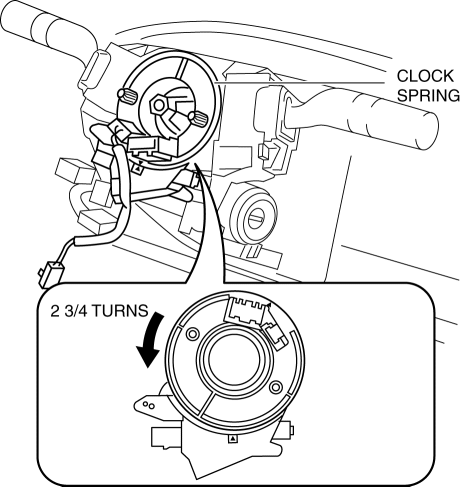
3. Turn the clock spring counterclockwise 2 3/4 turns
.
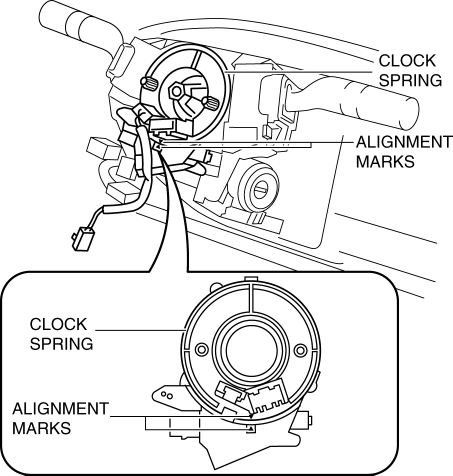
4. Align the mark on the clock spring with the mark on the outer housing.
 Active Command Modes Inspection [Instrument Cluster]
1. Connect the M-MDS (IDS) to the DLC-2.
2. After the vehicle is identified, select the following items from the initialization
screen of the IDS.
a. Select “DataLogger”.
b. Select “ ...
 Clock Spring Inspection [Standard Deployment Control System]
1. Disconnect the negative battery cable..
2. Remove the driver–side air bag module..
3. Remove the steering wheel..
4. Remove the column cover.
5. Remove the clock spring..
6. Verify that ...
Other materials:
Clock Switch Inspection
NOTE:
Clock switch built with the hazard warning switch.
1. Disconnect the negative battery cable..
2. Remove the clock switch..
3. Verify resistance between the clock switch terminals.
If the resistance is not as specified, replace the clock switch.
Between t ...
Generator Removal/Installation [Mzr 2.0, Mzr 2.5]
WARNING:
Remove and install all parts when the engine is cold, otherwise they can
cause severe burns or serious injury.
When the battery cables are connected, touching the vehicle body with generator
terminal B will generate sparks. This can cause personal injury, fire, and ...
Air Intake Actuator Inspection [Full Auto Air Conditioner]
1. Connect battery positive voltage to air intake actuator terminal B (or C),
connect terminal C (or B) to ground, and then verify that the air intake actuator
operates as shown in the table.
If the operation condition is not normal, replace the air intake actuator.
...
