
Mazda 3 Service Manual: Clock Spring Inspection [Two Step Deployment Control System]
1. Disconnect the negative battery cable..
2. Remove the driver–side air bag module..
3. Remove the steering wheel..
4. Remove the column cover.
5. Remove the clock spring..
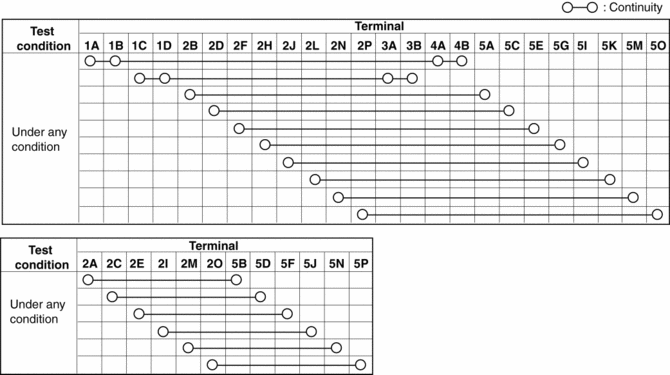
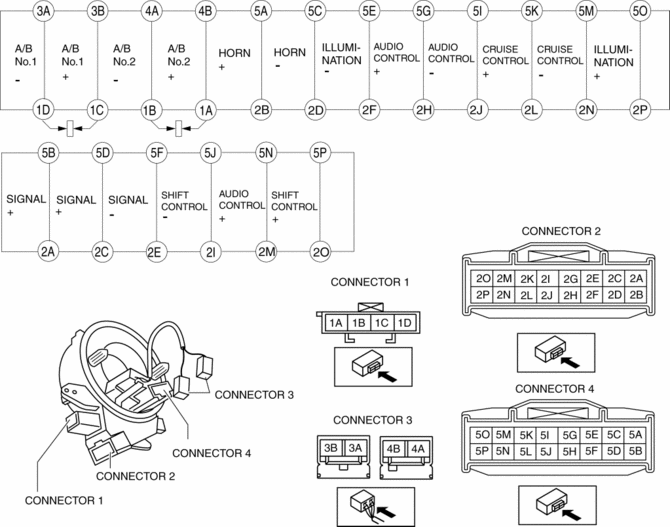
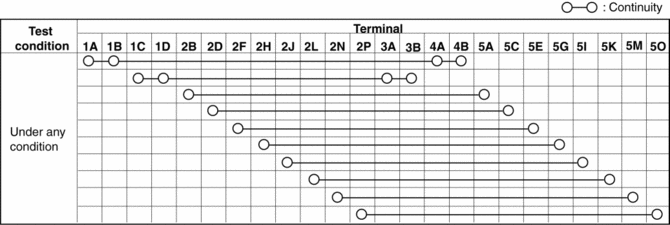
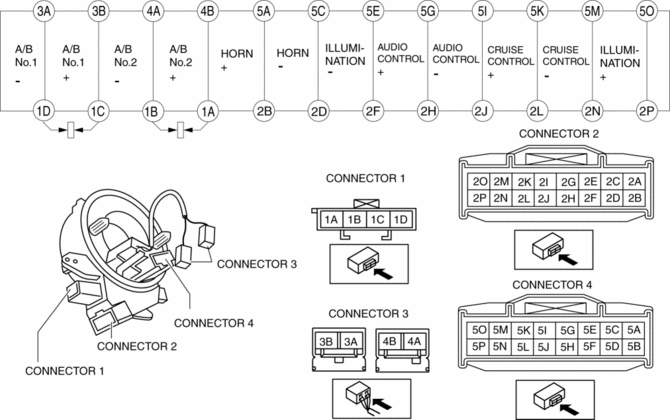
6. Verify that the continuity is as indicated in the table.
-
If not as indicated in the table, replace the clock spring.
NOTE:
-
When the vehicle-side connector for the clock spring is disconnected, terminals 1A, 1B, 1C and 1D are shorted to prevent unexpected operation (deployment) of the air bag module.
Vehicles with steering switch
Vehicles without steering switch
 Clock Spring Inspection [Standard Deployment Control System]
1. Disconnect the negative battery cable..
2. Remove the driver–side air bag module..
3. Remove the steering wheel..
4. Remove the column cover.
5. Remove the clock spring..
6. Verify that ...
 Control System Personalization Features Setting Procedure
1. Connect the M-MDS to the DLC-2.
2. After the vehicle is identified, select the following items from the initial
screen of the M-MDS.
When using the IDS (laptop PC)
Sele ...
Other materials:
Relay Block Inspection [With Advanced Keyless Entry And Push Button Start System]
1. Disconnect the negative battery cable..
2. Remove the following parts:
a. Driver-side front scuff plate.
b. Driver-side front side trim.
c. Hood release lever.
d. Upper panel.
e. Shift knob (MTX)(See MANUAL TRANSAXLE SHIFT MECHANISM REMOVAL/INSTALLATION
[G66M-R].)(See MANUAL TRANSAX ...
Rear seats
In the Subaru Solterra, rear seatbacks can be reclined or folded
using simple lever operations, providing flexibility for passenger comfort and cargo
space expansion.
Adjustment procedure
Pull the seatback angle adjustment lever A to adjust the angle of the Subaru
Solterra rear seatback.
...
Parking Brake
CAUTION
Driving with the parking brake on
will cause excessive wear of the brake
parts.
NOTE
For parking in snow, refer to Winter Driving regarding parking
brake use.
Setting the parking brake
Depress the brake pedal and then firmly
pull the parking brake lever fully upwar ...
