
Mazda 3 Service Manual: General Procedures (Brake)
Wheel and Tire Installation
1. When installing the wheels and tires, tighten the wheel nuts in a criss-cross pattern to the following tightening torque.
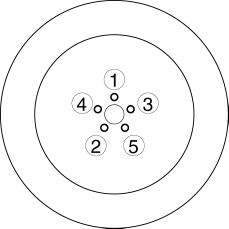
-
Tightening torque
-
88—118 N·m {9.0—12 Kgf·m, 65—87 ft·lbf}
Brake Lines Disconnection
1. If any brake line has been disconnected during the procedures, add brake fluid, bleed the brakes, and inspect for leakage after the procedure has been completed.
CAUTION:
-
Brake fluid will damage painted surfaces. Be careful not to spill any on painted surfaces. If it is spilled, wipe it off immediately.
Brake Pipe Flare Nut Tightening
1. Tighten the brake pipe flare nut using the commercially available flare nut wrench.
Connector Disconnection
1. Disconnect the negative battery cable before performing any work that requires handling of connectors..
ABS/DSC Related Parts
1. Make sure that there are no DTCs in the ABS/DSC memory after working on ABS/DSC related parts. If there are any DTCs in the memory, clear them.
DSC Related Parts Sensor Initialization Procedure
WARNING:
-
If the initialization procedure is not completed, the DSC will not operate properly and it might cause an unexpected accident. Therefore, when replacing or removing the following parts, make sure to perform the initialization procedure to ensure proper DSC operation.
1. When replacing or removing the following parts, perform the initialization procedure..
-
DSC HU/CM
 Disc Pad (Rear) Replacement
1. Remove in the order indicated in the table.
2. Install in the reverse order of removal.
3. After installation, pump the brake pedal a few times and inspect the following:
Parking brake ...
 Master Cylinder Removal/Installation [Mzr 2.0, Skyactiv G 2.0, Mzr 2.5]
1. Remove the battery and battery tray..
2. Remove in the order indicated in the table.
3. Install in the reverse order of removal.
1
Brake fluid level sensor connect ...
Other materials:
Headlight Aiming
CAUTION:
If the headlight aiming is adjusted with cargo in the vehicle, it may not
adjust correctly. Adjust the headlight aiming with the vehicle under the following
conditions:
No occupants inside vehicle
Cargo other than spare tire, jack, and tools not loaded
...
Call Interrupt
A call can be interrupted to receive an
incoming call from a third party.
When is selected or the pickup
button on the steering wheel is pressed,
the current call is held and the system
switches to the new incoming call.
When is selected, the current
call is ended and the system switche ...
Active Command Modes Inspection [Blind Spot Monitoring (Bsm)]
1. Connect the M-MDS (IDS) to the DLC-2.
2. After the vehicle is identified, select the following items from the initialization
screen of the IDS.
a. Select “DataLogger”.
b. Select “Modules”.
c. Select “BSML” or “BSMR”.
3. Select the simulation items from the PID tabl ...
