
Mazda 3 Service Manual: Ignition Switch Inspection [Without Advanced Keyless Entry And Push Button Start System]
1. Disconnect the negative battery cable..
2. Remove the column cover..
3. Remove the ignition switch..
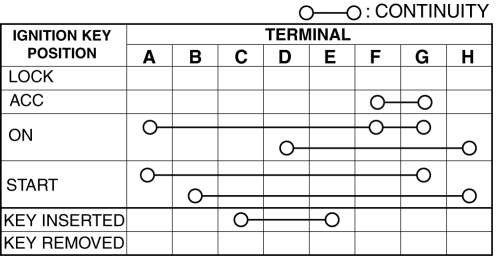
4. Verify that the continuity between the ignition switch terminals is as indicated in the table.
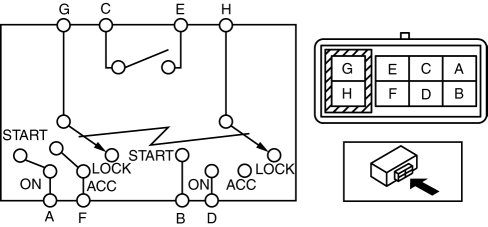
-
If not as indicated in the table, replace the ignition switch.
 Trunk Lid Key Cylinder Removal/Installation
1. Disconnect the negative battery cable..
2. Remove the trunk lid trim..
3. Lift the clip in the direction of the arrow (1), and pull out the key rod
in the direction of the arrow (2).
4. ...
 Ignition Switch Removal/Installation [Without Advanced Keyless Entry And Push
Button Start System]
Ignition Switch Removal/Installation [Without Advanced Keyless Entry And Push
Button Start System]
1. Disconnect the negative battery cable..
2. Remove the column cover..
3. Detach the tab.
4. Pull the pin in the direction of the arrow shown in the figure and release
the lock.
5. ...
Other materials:
How to Use Stitcher™* Radio
What is Stitcher™ Radio?
Stitcher™ radio is an application which can be used to listen to Internet radio
or stream
podcasts.
Recommended content is automatically selected by registering content which you
put into
your favorites, or by pressing the Like or Dislike button.
For details ...
Door Sash Film Removal
1. Disconnect the negative battery cable.
2. Partially peel back the glass run channel.
3. Partially peel back the door weatherstrip.
4. Remove the following parts:
a. Inner garnish.
b. Front door trim.
c. Power outer mirror.
d. Rear door trim.
e. Rear door speaker.
f. Rear door qu ...
Vehicle Loading
WARNING
Do not tow a trailer with this vehicle:
Towing a trailer with this vehicle is dangerous because it has not been
designed to tow a
trailer and doing so will aff ect the drive system which could result in
vehicle damage.
This section will guide you in the proper l ...
